밑바닥부터 구현해보는 UI라이브러리 만들기3 (생명주기 훅)
예제링크
npm 링크: https://www.npmjs.com/package/reona
프로젝트 링크: https://github.com/dkpark10/reona
해당 게시글에 관한 링크: https://github.com/dkpark10/reona-track/tree/master/track/04-life-cycle
생명주기 훅#
컴포넌트 생명주기 제어를 위해 mount, unmount 훅을 직접 구현한다. 조건부 렌더링 상황에서 Child, Child2 컴포넌트의 생성과 제거 시점에 각각의 훅이 정확히 호출되는 것을 목표로 한다.
생명주기의 전체 다이어그램은 다음과 같다.
1render phase
2↓
3dom patch
4↓
5mount hook
6↓
7update hook
8↓
9unmount hook
1import { createComponent, state, html, mounted, updated } from '../core';
2
3function Child({ value }) {
4+  mounted(() => {
5+    console.log('mount child');
6+    return () => {
7+      console.log('unmount child');
8+    }
9+  });
10  return html`<div id="child1">${value}</div>`;
11}
12
13function Child2({ value }) {
14+  mounted(() => {
15+    console.log('mount child2');
16+    return () => {
17+      console.log('unmount child2');
18+    }
19+  });
20  return html`<div id="child2">${value}</div>`;
21}
22
23function App() {
24  const data = state({
25    bool: true,
26  });
27
28  const trigger = () => {
29    data.bool = !data.bool;
30  };
31
32  return html`
33    <div id="app">
34      <button type="button" @click=${trigger}>trigger</button>
35      ${data.bool ?
36        createComponent(Child, {
37          props: {
38            value: '1',
39          },
40        })
41        : createComponent(Child2, {
42          props: {
43            value: '2',
44          },
45        })
46      }
47    </div>
48  `;
49}
cleanUp 함수는 react interface와 같이 mount 콜백 안에 리턴 함수로 작성했다. 이벤트 리스너 할당 및 타이머 설정 및 해제를 같은 클로저에 사용할 수 있으므로 DX의 이점이 있어서이다.
1mounted(() => {
2  // timer를 따로 외부에 둬야 하고 렌더링 시 같은 메모리 주소를 보장해야 한다.
3  timer = setTimeout(timerHandler, 1_000);
4  // handler를 따로 외부에 둬야 하고 렌더링 시 같은 메모리 주소를 보장해야 한다.
5  window.addEventListener('load', handler);
6})
7
8unmounted(() => {
9  clearTimeout(timer);
10  window.addEventListener('load', handler);
11})
component-instance에서 훅을 다룰 멤버변수 추가#
component-instance에서 상태 훅과 마찬가지로 다수의 mount, unmount 훅을 받도록 배열을 선언한다.
component-instance.js
1export default class ComponentInstance {
2  /** @type {Array<unknown>} */
3  states = [];
4
5  /** @type {Array<() => void | (() => () => void)} */
6+  mountHooks = [];
7
8  /** @type {Array<() => void>} */
9+  unMountHooks = [];
10
11  hookIndex = 0;
12
13  hookLimit = 0;
14
15  stateHookIndex = 0;
16
17  isMounted = false;
18
19  constructor(component, sequence) {
20    this.component = component;
21    /** @description 해당 컴포넌트가 트리에서 어디에 위치해 있는지 식별하는 넘버 */
22    this.sequence = sequence;
23  }
24  // ...생략
25}
mount 구현#
mount 함수는 콜백을 인자로 받아 일전에 선언한 mountHooks배열에 푸시한다.
일전에 01(상태) 아티클에서 언급한것과 마찬가지로 렌더링 페이즈에서 현재 다루고 있는 컴포넌트 인스턴스가 falsy한 값이라면 즉 함수형 컴포넌트 루트 스코프에 선언하지 않았다면 에러를 던진다.
훅 개수는 최초 마운트 이전 시점에만 고정한다. 이는 React의 Hook Rule과 동일한 제약으로, 렌더링마다 훅 순서가 변경되어 발생하는 상태 불일치를 방지하기 위함이다.
hooks.js
1import  { getCurrentInstance } from './component-instance';
2
3function checkInvalidHook(currentInstance) {
4  if (currentInstance.isMounted && currentInstance.hookIndex > currentInstance.hookLimit) {
5    throw new Error('훅은 함수 최상단에 선언해야 합니다.');
6  }
7
8  // 마운트 이전에만 훅 포인터를 증감
9  if (!currentInstance.isMounted) {
10    currentInstance.hookIndex += 1;
11  }
12}
13
14export function mounted(callback) {
15  const currentInstance = getCurrentInstance();
16  if (currentInstance === null) {
17    throw new Error('mount 함수는 컴포넌트 내에서 선언해야 합니다.');
18  }
19
20  checkInvalidHook(currentInstance);
21  if (currentInstance.isMounted) {
22    return;
23  }
24  currentInstance.mountHooks.push(callback);
25}
mount 훅은 DOM이 실제로 부착된 이후 실행되어야 한다. 따라서 초기 렌더링이 완료된 뒤 runMount 함수를 호출하도록 설계했다.
mount 훅은 cleanup 함수를 반환할 수 있으며, 해당 반환값은 unMountHooks 배열에 저장된다.
component-instance.js
1export default class ComponentInstance {
2  render(parentElement, isRerender) {
3    // 부모 리렌더링으로 인한 자식 리렌더링이라면
4    if (isRerender) {
5      this.hookIndexInitialize();
6    }
7
8    /** @description 현재 렌더링 되고 있는 컴포넌트를 할당 */
9    currentInstance = this;
10    const template = this.component(this.props);
11
12    this.parentElement = parentElement;
13    this.prevVnodeTree = parse(template, this.sequence + 1);
14
15    this.currentDom = createDOM(this.prevVnodeTree, parentElement);
16    parentElement.insertBefore(this.currentDom, null);
17-   this.isMounted = true;
18-   this.hookLimit = this.hookIndex;
19+   this.runMount();
20  }
21
22+ runMount() {
23+   if (this.isMounted) return;
24
25+   for (const fn of this.mountHooks) {
26      // 마운트 훅 실행
27+     const cleanUp = fn();
28+     if (cleanUp && typeof cleanUp === 'function') {
29        // 반환값이 있다면 푸시
30+       this.unMountHooks.push(cleanUp);
31+     }
32+   }
33+   this.isMounted = true;
34+   this.hookLimit = this.hookIndex;
35+   this.mountHooks = null;
36  }
37}
unmount 구현#
unmount구현은 이전 렌더 페이즈에서 저장된 Vdom과 현재 렌더 페이즈에 저장된 Vdom과의 비교작업을 한다.
그 이전에 앞서 현재 렌더링 결과를 Vdom으로 파싱해주는 작업이 선행되야 한다.
1. reRender에서 unmount 호출 시점#
현재 Vdom이 파싱된 후, DOM 교체 전에 unmount를 수행한다.
component-instance.js
1export default class ComponentInstance {
2
3  reRender() {
4    this.hookIndexInitialize();
5    currentInstance = this;
6    const template = this.component(this.props);
7
8    this.nextVnodeTree = parse(template, this.sequence + 1);
9    // 이전 Vdom, 현재 Vdom을 비교하기 위해 this.nextVnodeTree가 할당된 후 unmount 수행
10+   this.runUnmount(this.prevVnodeTree, this.nextVnodeTree);
11
12    const newDom = createDOM(this.nextVnodeTree, this.parentElement);
13    this.currentDom.replaceWith(newDom);
14    this.currentDom = newDom;
15    this.prevVnodeTree = this.nextVnodeTree;
16  }
17}
2. runUnmount 로직#
이전/현재 Vdom에서 각각 인스턴스를 수집한 뒤, 이전에는 있었지만 현재에는 없는 인스턴스의 cleanup을 실행한다.
1 runUnmount(prevVnode, nextVnode) {
2    // 이전 렌더페이즈에서 존재하는 컴포넌트 인스턴스
3  const prevInstances = this.collectInstances(prevVnode);
4    // 현재 렌더페이즈에서 존재하는 컴포넌트 인스턴스
5  const nextInstances = this.collectInstances(nextVnode);
6
7    // 이전 렌더페이즈에서 인스턴스 순회
8  for (const prevInstance of prevInstances) {
9
10      // 현재 인스턴스에 존재하지 않는다면
11    if (!nextInstances.has(prevInstance)) {
12      for (const fn of prevInstance.unMountHooks) {
13          // 이전 인스턴스에 unMountHooks을 실행
14        fn();
15      }
16
17      const instanceMap = getInstanceMap();
18      instanceMap.get(prevInstance.component)?.delete(prevInstance.sequence);
19
20        /**
21         * instance.component는 함수형 컴포넌트
22         * ex) import FuntionalComponent from './FuntionalComponent';
23         * FuntionalComponent는 모듈스코프에 의해 unmount 되더라도 메모리에 남아있기에 GC가 수집을 못함
24        */
25      if ((instanceMap.get(prevInstance.component)?.size || 0) <= 0) {
26        instanceMap.delete(prevInstance.component);
27      }
28    }
29  }
30}
3. 인스턴스 맵 정리와 GC#
인스턴스 맵은 WeakMap이지만, import한 함수 컴포넌트를 키로 사용하기 때문에 모듈 스코프에서 계속 참조된다. 따라서 명시적으로 삭제해줘야 GC가 수집할 수 있다.
1const instanceMap = new WeakMap();
2
3if ((instanceMap.get(prevInstance.component)?.size || 0) <= 0) {
4  instanceMap.delete(prevInstance.component);
5}
index.js
1function createComponent(component, options) {
2  const instanceMap = getInstanceMap();
3
4  // component 파라미터를 키로 사용
5  const func = function getInstance(sequence) {
6    let instanceDeps = instanceMap.get(component);
7    if (!instanceDeps) {
8      instanceDeps = new Map();
9    }
10  }
11  // ...생략
12}
Vdom을 활용하여 해당 렌더페이즈에서 살아있던 컴포넌트 인스턴스 수집 함수#
현재 렌더 페이즈에서 살아있는 컴포넌트 인스턴스를 수집하기 위해 Vdom 트리를 순회한다.
-
타입이 component(createComponent 반환 함수)인 경우
→ 해당 인스턴스의 이전 Vdom을 추출하기 위해 재귀 수행 -
타입이 element인 경우
→ children을 순회하며 동일하게 재귀 수행
1collectInstances(
2    vnode,
3    set = new Set()
4  ) {
5    if (!vnode) return set;
6    switch (vnode.type) {
7      case 'component':
8        set.add(vnode.instance);
9        this.collectInstances(vnode.instance.prevVnodeTree, set);
10        break;
11      case 'element':
12        vnode.children.forEach((child) => this.collectInstances(child, set));
13        break;
14      case 'text':
15        break;
16    }
17    return set;
18  }
예제#
아래 예제에서는 조건부 렌더링 시 mount / unmount 훅 호출 여부를 확인하는 예제이다.
updated 훅 구현#
vue의 updated, react의 의존성 값이 들어가 있는 useEffect와 같이 데이터 관찰 후 변경 시 수행할 훅을 만들어 본다. 이전 렌더링 페이즈와 현재 렌더링 페이즈의 값 비교를 해야 하기에 콜백함수와 데이터를 저장할 객체 형식으로 만든다.
인터페이스 설계#
첫 번째 파라미터로 관찰할 데이터 객체를, 두 번째 파라미터로 변경 시 실행할 콜백을 받는다. 콜백의 인자로는 이전 값(prevSnapshot)이 전달된다.
1function Component() {
2  const data = state({
3    value: 1,
4  });
5
6  updated(data, (prev) => {
7    console.log(prev);
8  });
9
10  const trigger = () => {
11    data.value += 1;
12  };
13
14  return html`...`;
15}
hooks.js
1export function updated(data, callback) {
2  const currentInstance = getCurrentInstance();
3  if (currentInstance === null) {
4    throw new Error('updated 함수는 컴포넌트 내에서 선언해야 합니다.');
5  }
6
7  checkInvalidHook(currentInstance);
8
9  const dep = currentInstance.updatedHooks;
10  const index = currentInstance.updatedHookIndex++;
11
12  // 마운트 이후, 업데이트 시
13  if (!dep[index]) {
14    dep[index] = {
15      data: data,
16      callback: callback,
17      prevSnapshot: { ...data },
18    };
19  // 마운트 이전
20  } else {
21    dep[index].callback = callback;
22  }
23}
component-instance.js
1export default class ComponentInstance {
2  states = [];
3
4  mountHooks = [];
5
6  unMountHooks = [];
7
8  /** @type {Array<object>} */
9+  updatedHooks = [];
10
11+  updatedHookIndex = 0;
12
13  constructor(component, sequence) { //...생략 }
14
15  hookIndexInitialize() {
16    this.stateHookIndex = 0;
17+   this.updatedHookIndex = 0;
18  }
19
20  render(parentElement, isRerender) {
21    // ... 생략
22  }
23
24  reRender() {
25    this.hookIndexInitialize();
26    // ... 생략
27
28    this.prevVnodeTree = this.nextVnodeTree;
29+   this.runUpdate();
30  }
31
32+  runUpdate() {
33+    for (const hook of this.updatedHooks) {
34+      if (!hook) continue;
35
36      // 데이터를 객체형식으로 받아 메모리 값 비교가 아닌 값만을 확인하는 얕은 비교 수행
37+      const hasChanged = Object.keys(hook.data).some(
38+        (key) => hook.data[key] !== hook.prevSnapshot[key]
39+      );
40
41      // 값이 변경되었다면 콜백을 실행하고 현재 스냅샷을 저장
42+      if (hasChanged) {
43+        hook.callback(hook.prevSnapshot);
44        // 이전 스냅샷을 저장
45+        hook.prevSnapshot = { ...hook.data };
46+      }
47+    }
48+  }
49}
runUpdate 함수는 react, vue와 같이 리렌더링 시 dom update 후 실행을 한다. updated 훅은 첫번째 파라미터로 데이터를 객체형식으로 받았기에 값만을 확인하는 얕은 비교를 수행한다. 이는 React useEffect dependency 비교 방식과 동일한 동작 모델이다. (Object.is)
테스트#
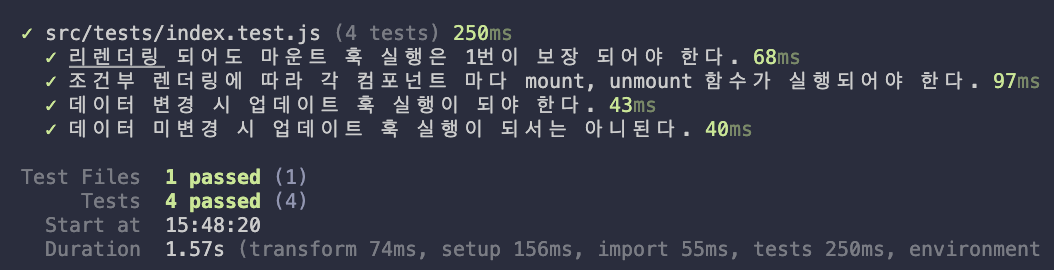
구현한 훅들이 정상 동작하는지 테스트한다.
테스트 케이스#
| 테스트 | 검증 내용 |
|---|---|
| mount 1회 보장 | 리렌더링되어도 mount는 최초 1회만 실행 |
| 조건부 mount/unmount | 컴포넌트 토글 시 각각의 훅이 정확히 호출 |
| updated 실행 | 데이터 변경 시 콜백 실행 + 이전 값 전달 |
| updated 미실행 | 값이 동일하면 콜백 미실행 |
핵심 테스트: mount 1회 보장#
https://github.com/dkpark10/reona-track/blob/master/track/04-life-cycle/src/tests/index.test.js
1import { expect, test, beforeEach, afterEach } from 'vitest';
2import { rootRender } from '../core/runtime-dom';
3import { createComponent, state, html, mounted, updated } from '../core';
4
5const flushRaf = () => new Promise((resolve) => requestAnimationFrame(() => resolve()));
6
7beforeEach(() => {
8  const div = document.createElement('div');
9  div.id = 'root';
10  document.body.appendChild(div);
11});
12
13afterEach(() => {
14  if (document.getElementById('root')) {
15    document.body.removeChild(document.getElementById('root'));
16  }
17});
18
19test('리렌더링 되어도 마운트 훅 실행은 1번이 보장 되어야 한다.', async () => {
20  const mountFn = vi.fn();
21
22  function Component() {
23    const data = state({
24      bool: true,
25    });
26
27    mounted(mountFn);
28
29    const trigger = () => {
30      data.bool = !data.bool;
31    };
32
33    return html`
34      <div id="app">
35        <button type="button" @click=${trigger}>trigger</button>
36      </div>
37      `;
38  }
39  rootRender(document.getElementById('root'), Component);
40
41  document.querySelector('button')?.click();
42  await flushRaf();
43  expect(mountFn).toHaveBeenCalledOnce();
44
45  document.querySelector('button')?.click();
46  await flushRaf();
47  expect(mountFn).toHaveBeenCalledOnce();
48});
49
50test('조건부 렌더링에 따라 각 컴포넌트 마다 mount, unmount 함수가 실행되어야 한다.', async () => {
51  const unMountFn1 = vi.fn(() => {
52    console.log('unmount1');
53  });
54  const mountFn1 = vi.fn(() => {
55    console.log('mount1');
56    return unMountFn1;
57  });
58  const unMountFn2 = vi.fn(() => {
59    console.log('unmount2');
60  });
61  const mountFn2 = vi.fn(() => {
62    console.log('mount2');
63    return unMountFn2;
64  });
65
66  function Child({ value }) {
67    mounted(mountFn1);
68    return html`<div id="child1">${value}</div>`;
69  }
70
71  function Child2({ value }) {
72    mounted(mountFn2);
73    return html`<div id="child2">${value}</div>`;
74  }
75
76  function App() {
77    const data = state({
78      bool: true,
79    });
80
81    const trigger = () => {
82      data.bool = !data.bool;
83    };
84
85    return html`
86      <div id="app">
87        <button type="button" @click=${trigger}>trigger</button>
88        ${data.bool ?
89        createComponent(Child, {
90          props: {
91            value: '1',
92          },
93        })
94        : createComponent(Child2, {
95          props: {
96            value: '2',
97          },
98        })
99      }
100      </div>
101    `;
102  }
103
104  rootRender(document.getElementById('root'), App);
105
106  expect(document.getElementById('child1')).toBeInTheDocument();
107  expect(document.getElementById('child1')?.textContent).toBe('1');
108
109  document.querySelector('button')?.click();
110  await flushRaf();
111  expect(unMountFn1).toHaveBeenCalled();
112  expect(mountFn2).toHaveBeenCalled();
113  expect(document.getElementById('child2')).toBeInTheDocument();
114  expect(document.getElementById('child2')?.textContent).toBe('2');
115
116  document.querySelector('button')?.click();
117  await flushRaf();
118  expect(unMountFn2).toHaveBeenCalled();
119  expect(mountFn1).toHaveBeenCalled();
120  expect(document.getElementById('child1')).toBeInTheDocument();
121  expect(document.getElementById('child1')?.textContent).toBe('1');
122
123  document.querySelector('button')?.click();
124  await flushRaf();
125  expect(unMountFn1).toHaveBeenCalled();
126  expect(mountFn2).toHaveBeenCalled();
127  expect(document.getElementById('child2')).toBeInTheDocument();
128  expect(document.getElementById('child2')?.textContent).toBe('2');
129
130  document.querySelector('button')?.click();
131  await flushRaf();
132  expect(unMountFn2).toHaveBeenCalled();
133  expect(mountFn1).toHaveBeenCalled();
134  expect(document.getElementById('child1')).toBeInTheDocument();
135  expect(document.getElementById('child1')?.textContent).toBe('1');
136});
137
138test('데이터 변경 시 업데이트 훅 실행이 되야 한다.', async () => {
139  let expectedValue;
140  const updatedFn = vi.fn((prev) => {
141    expectedValue = prev;
142  });
143
144  function Component() {
145    const data = state({
146      value: 1,
147    });
148
149    updated(data, updatedFn);
150
151    const trigger = () => {
152      data.value += 1;
153    };
154
155    return html`
156      <div id="app">
157        <button type="button" @click=${trigger}>trigger</button>
158      </div>
159      `;
160  }
161  rootRender(document.getElementById('root'), Component);
162
163  document.querySelector('button')?.click();
164  await flushRaf();
165  expect(updatedFn).toHaveBeenCalledTimes(1);
166  expect(expectedValue).toEqual({ value: 1 });
167
168  document.querySelector('button')?.click();
169  await flushRaf();
170  expect(updatedFn).toHaveBeenCalledTimes(2);
171  expect(expectedValue).toEqual({ value: 2 });
172});
173
174test('데이터 미변경 시 업데이트 훅 실행이 되서는 아니된다.', async () => {
175  let expectedValue;
176  const updatedFn = vi.fn((prev) => {
177    expectedValue = prev;
178  });
179
180  function Component() {
181    const data = state({
182      value: 1,
183    });
184
185    updated(data, updatedFn);
186
187    const noop = () => {
188      data.value = data.value;
189    };
190
191    return html`
192      <div id="app">
193        <button type="button" @click=${noop}>noop</button>
194      </div>
195      `;
196  }
197  rootRender(document.getElementById('root'), Component);
198
199  document.querySelector('button')?.click();
200  await flushRaf();
201  expect(updatedFn).not.toHaveBeenCalled();
202  expect(expectedValue).toBeUndefined();
203
204  document.querySelector('button')?.click();
205  await flushRaf();
206  expect(updatedFn).not.toHaveBeenCalled();
207  expect(expectedValue).toBeUndefined();
208});
한계#
updated 훅의 의존성 추적#
1// 현재: 전체 객체를 관찰
2updated(objectData, (prev) => {});
3
4// 원시 객체도 의존성 추가
5updated(1, (prev) => {});
전체 객체를 관찰하면 관련 없는 속성 변경에도 콜백이 실행될 수 있다. 현재 원시객체가(number, string...) 이 들어올 때 비교를 안하고 있으므로 정확히는 Obejct.keys()로 비교를 하고 있어 객체 타입이 강제화 된다.
비동기 콜백에 대한 구현#
1mounted(async () => {
2  const data = await fetch(...);
3  return () => {
4    ...
5  };
6});
비동기 콜백에 대해 promise를 반환 시 cleanUp 함수를 수집할 수 없다.