밑바닥부터 구현해보는 UI라이브러리 만들기2 (중첩 컴포넌트)
예제링크
npm 링크: https://www.npmjs.com/package/reona
프로젝트 링크: https://github.com/dkpark10/reona
해당 게시글에 관한 링크1: https://github.com/dkpark10/reona-track/tree/master/track/02-component
해당 게시글에 관한 링크2: https://github.com/dkpark10/reona-track/tree/master/track/03-nested_component
컴포넌트 설계#
컴포넌트는 재사용 가능한 UI 조각이다. 단순히 HTML 태그만 사용한다면 문제가 없지만, 컴포넌트 안에 다른 컴포넌트를 중첩해서 사용할 때는 각 컴포넌트의 상태를 어떻게 관리할지 고민이 필요하다.
1import { html, state, createComponent } from '../core';
2
3function Child({ value }) {
4  return html`<li>${value}</li>`;
5}
6
7export default function App() {
8  const data = state({
9    count: 0,
10  });
11
12  const onClick = () => {
13    data.count += 1;
14  }
15
16  return html`
17    <div id="app">
18      <button type="button" @click=${onClick}>increase</button>
19      <ul>
20        ${createComponent(Child, {
21          props: {
22            value: data.count + 1,
23          }
24        })}
25        ${createComponent(Child, {
26          props: {
27            value: data.count + 2,
28          }
29        })}
30        ${createComponent(Child, {
31          props: {
32            value: data.count + 3,
33          }
34        })}
35      </ul>
36    </div>
37  `;
38}
컴포넌트 인스턴스 관리#
컴포넌트는 mount 이후 unmount 되기 전까지 런타임에 내부 상태 객체(컴포넌트 인스턴스)로 유지된다.
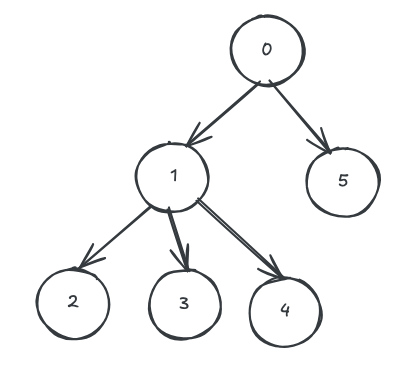
단일 렌더링 트리 기준으로 동일한 depth + sibling index 조합은 하나의 렌더링 페이즈 내에서 유일하다.
따라서 학습용 구현에서는 DOM 트리 내에서 순차적으로 렌더링하는 순서를 기반으로 컴포넌트 인스턴스를 식별할 수 있다.
이는 구현을 단순화하기 위한 순차적 아이디를 사용한다.
key를 명시적으로 개발자가 넣는 경우도 고려했지만 DX의 저하와 컴포넌의 개수가 무수히 많을경우 일일이 서로 다른 고유 key를 기억하고 주입하기에 어려움이 있다.
1// key: sequence (number), value: ComponentInstance
2const instanceMap = new Map();
sequence를 통한 컴포넌트 식별#
컴포넌트 인스턴스를 식별하려면 트리 내 위치 정보가 필요하다. 이 위치값을 sequence라 부르며, parser가 Vdom을 순회하면서 순차적으로 할당한다.
createComponent 함수#
중첩 컴포넌트를 생성하는 함수를 작성해보자.
1/**
2 * @typedef {Object} ComponentOption
3 * @property {object} props
4 */
5
6/**
7 * @param {Function} component
8 * @param {ComponentOption} options
9 */
10function createComponent(component, options) {
11  const instanceMap = getInstanceMap();
12
13  /**
14   * @param {number} sequence
15   * sequence를 key로서 사용
16   * parser에서 해당 함수를 사용한다.
17   */
18  const func = function getInstance(sequence) {
19    let instance = instanceMap.get(sequence);
20    if (!instance) {
21      instance = new ComponentInstance(component, sequence);
22      instanceMap.set(sequence, instance);
23    }
24
25    // props가 있다면 props를 할당
26    if (options && options.props) {
27      instance.props = options.props;
28    }
29
30    return instance;
31  }
32
33  // parser 에서 컴포넌트를 생성하는 함수
34  func.__isCreateComponent = true;
35  return func;
36}
여기서 해당 createComponent의 첫번째 파라미터로 받은 컴포넌트 함수는 dom tree에서 몇번째 순서에 위치해야 하는지 해당 컴포넌트를 호출하는 부모가 누구인지 알 수 없다.
그래서 인스턴스를 생성하는 함수와 순서를 파라미터에 넣을 수 있도록 함수를 반환하는 고차함수를 사용한다. 그저 컴포넌트 인스턴스를 생성할 함수만을 반환하고 사용하는 쪽에서 순서를 넣도록 위임하는 것이다.
그렇다면 해당 함수를 어디서 누가 사용해야 할까? parser에서 Vdom 생성 시 재귀적으로 탐색하는 도중 해당 함수를 사용하면 된다.
컴포넌트의 고유 위치는 rootRender시 componentInstance를 생성할 때 생성자로 sequence를 요구한다. 루트 렌더링 시 0으로 넣어준다.
runtime-dom.js#
1// 부착할 엘리먼트와 함수형 컴포넌트를 파라미터로 넘김
2function rootRender(
3  container,
4  component,
5) {
6  const instance = new ComponentInstance(component, 0); // 컴포넌트를 관리할 인스턴스 생성
7  instance.render(container);
8  return instance;
9}
그렇다면 componentInstance에서 Vdom을 생성할 때 자식 컴포넌트가 부모와 동일한 키값을 가지지 않도록 sequence의 멤버변수에 1을 추가하여 파싱한다.
component-instance.js#
1constructor(component, sequence) {
2  this.component = component;
3  /** @description 해당 컴포넌트가 트리에서 어디에 위치해 있는지 식별하는 넘버 */
4  this.sequence = sequence;
5}
6
7render(parentElement, isRerender) {
8  // 부모 리렌더링으로 인한 자식 리렌더링이라면 훅 포인터를 초기화
9  if (isRerender) {
10    this.stateHookIndex = 0;
11  }
12  currentInstance = this;
13  // props가 있으면 props를 넘김
14  const template = this.component(this.props);
15
16  this.parentElement = parentElement;
17  // 해당 컴포넌트 인스턴스의 sequence 에서 1을 추가 후 호출
18  this.prevVnodeTree = parse(template, this.sequence + 1);
19}
그렇다면 parser 함수에서 해당 순서 파라미터를 받아서 파싱을 진행한다.
1export default function parse(renderResult, sequence) {
2  let valueIndex = 0;
3  let currentSequence = sequence; // <-----------------------
4  ... 코드 생략
5
6// createComponent 반환 함수일 시
7+if (typeof value === 'function' && value.__isCreateComponent) {
8+  const getInstance = value;
9+  const instance = getInstance(currentSequence);
10
11  // 중복된 순서를 가지지 않기 위해 값을 증감
12+  currentSequence++;
13+  valueIndex++;
14
15+  return {
16+    type: 'component',
17+    instance,
18+  };
19+}
20... 코드 생략
중첩 컴포넌트가 있을 때 Vdom 결과에서 핵심은 type: "component"가 추가되는 것이다.
1html`
2  <div id="app">
3    <button type="button" @click=${onClick}>increase</button>
4    <ul>
5      ${createComponent(Child, {
6        props: {
7          value: data.count + 1,
8        }
9      })}
10      ${createComponent(Child, {
11        props: {
12          value: data.count + 2,
13        }
14      })}
15      ${createComponent(Child, {
16        props: {
17          value: data.count + 3,
18        }
19      })}
20    </ul>
21  </div>
22`;
23
24// Vdom 생성
25
26{
27    "type": "element",
28    "tag": "div",
29    "children": [
30        {
31            "type": "element",
32            "tag": "button",
33            "children": [
34                {
35                    "type": "text",
36                    "value": "increase"
37                }
38            ],
39            "attr": {
40                "type": "button"
41            }
42        },
43        {
44            "type": "element",
45            "tag": "ul",
46            "children": [
47                {
48                    "type": "component",
49                    "instance": {...} // <----- component instace 객체
50                },
51                {
52                    "type": "component",
53                    "instance": {...} // <----- component instace 객체
54                },
55                {
56                    "type": "component",
57                    "instance": {...} // <----- component instace 객체
58                },
59            ]
60        }
61    ],
62    "attr": {
63        "id": "app"
64    }
65}
createDOM에서 컴포넌트 타입 처리#
이제 실제 DOM을 생성하는 로직에서 type: "component"를 처리해야 한다.
컴포넌트 타입을 만나면 해당 인스턴스의 render 메서드를 호출한다. 두 번째 인자 true는 리렌더링 여부를 나타낸다. 실제 프레임워크에서는 각자의 재조정 전략, 알고리즘에 따라 자식을 리렌더링 하지 않을 수 있으나 본 구현에서는 부모가 렌더링함에 따라 자식도 리렌더링한다.
runtime-dom.js
1export function createDOM(vnode, parentElement) {
2  // 텍스트 노드
3  if (vnode.type === 'text') {
4    return document.createTextNode(vnode.value);
5  }
6
7  // 컴포넌트 노드: 인스턴스의 render 호출
8  if (vnode.type === 'component') {
9    const instance = vnode.instance;
10    instance.render(parentElement, true);
11    return null;  // 컴포넌트는 자체적으로 DOM에 삽입
12  }
13
14  // 일반 엘리먼트 노드
15  const el = document.createElement(vnode.tag);
16  // ... 속성 및 이벤트 바인딩 생략
17
18  vnode.children?.forEach((child) => {
19    const c = createDOM(child, el);
20    if (c) el.appendChild(c);
21  });
22
23  return el;
24}
중첩 컴포넌트 예제#
동일한 위치에서의 조건부 렌더링#
조건부 렌더링이나 구조 변경이 발생하면 동일 위치에 다른 컴포넌트가 배치될 수 있으므로, 추가 식별 전략이 필요하다.
참고로 모든 예제에 컴포넌트 루트 키는 0으로 가정한다.
1// root = 0;
2return html`
3  <div id="app">
4    ${data.bool
5      ? createComponent(Component, {
6          props: {
7            value: 1,
8          },
9        })
10      : createComponent(OtherComponent, {
11          props: {
12            value: 2
13          },
14        })
15    }
16  </div>`;
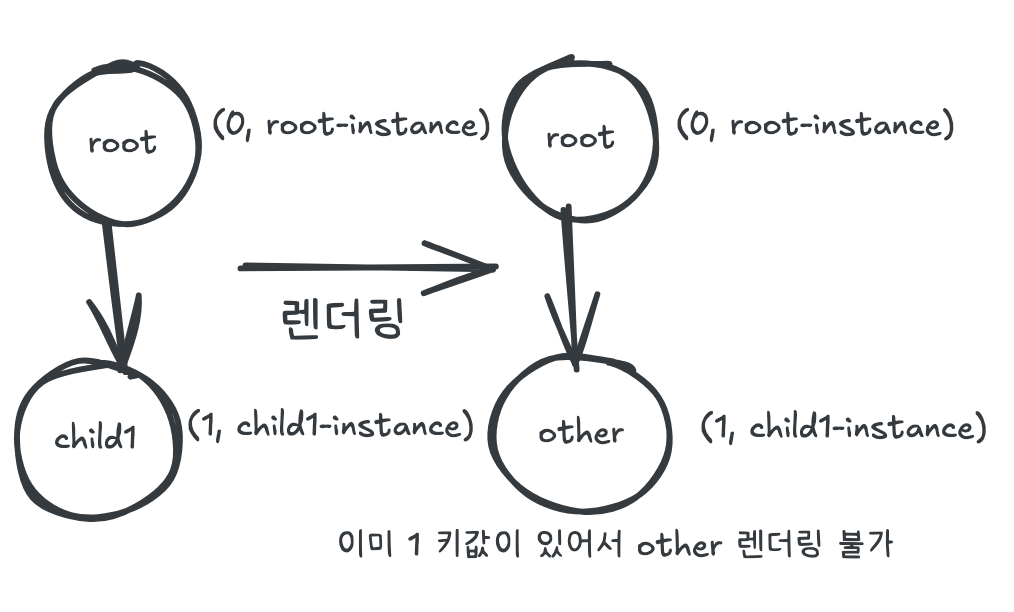
마운트된 컴포넌트 맵 관리는 위치값을 key로 두고 있기에 OtherComponent 컴포넌트가 렌더링 되야 하는 상황에서 동일한 key (여기서는 1)이 있기에 새로운 컴포넌트 인스턴스를 생성하지 않는다. 이러한 상황에서 OtherComponent를 어떻게 렌더링 해야 할까? 컴포넌트의 고유 정체성은 바로 무엇으로 정의해야 하는 것일까?
1function createComponent(component, options) {
2  const instanceMap = getInstanceMap();
3
4  const func = function getInstance(sequence) {
5    // 이미 키값 1의 인스턴스가 존재한다.
6    let instance = instanceMap.get(sequence);
7    if (!instance) {
8      instance = new ComponentInstance(component, sequence);
9      instanceMap.set(sequence, instance);
10    }
11    ... 생략
12  }
13}
컴포넌트 정체성#
동일한 위치에서 다른 컴포넌트를 렌더링하려면 key를 어떤 타입으로 할지 재정의 해야 한다.
컴포넌트의 정체성은 **"위치"**만으로는 부족하다. **"무엇인가(함수)"**도 포함해야 한다.
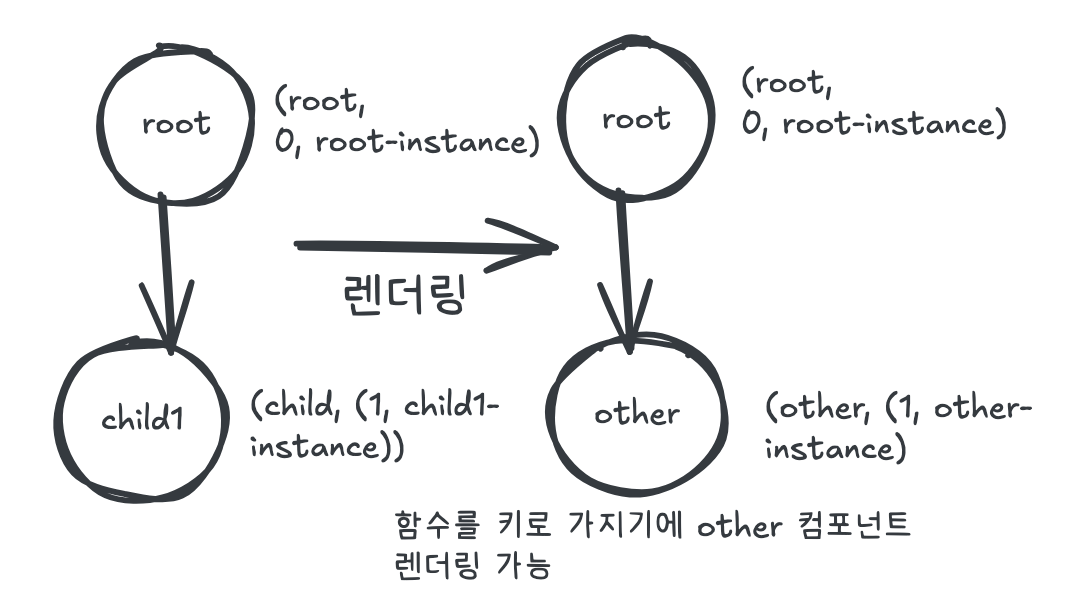
여기서 키를 컴포넌트 함수로 정의하고 값을 Map 객체로 정의한다면, 동일한 위치라도 다른 컴포넌트를 구분할 수 있다.
1// 변경 전: key가 sequence(number)
2const instanceMap = new Map();
3
4// 변경 후: key가 컴포넌트 함수, value가 Map(sequence, instance)
5const instanceMap = new WeakMap();
key를 함수로 쓰기위해 WeakMap을 사용했다. 그러나 import한 컴포넌트는 모듈 스코프에서 계속 참조되므로, GC가 객체를 수집할 수 없다.
이제 createComponent 함수를 수정한다. 핵심은 컴포넌트 함수를 1차 키, sequence를 2차 키로 사용하는 것이다.
1function createComponent(component, options) {
2  const instanceMap = getInstanceMap();
3
4  const func = function getInstance(sequence) {
5    // 1차: 컴포넌트 함수로 Map을 조회
6    let instanceDeps = instanceMap.get(component);
7    if (!instanceDeps) {
8      instanceDeps = new Map();
9    }
10
11    // 2차: sequence로 인스턴스 조회
12    let instance = instanceDeps.get(sequence);
13    if (!instance) {
14      instance = new ComponentInstance(component, sequence);
15      instanceDeps.set(sequence, instance);
16      instanceMap.set(component, instanceDeps);
17    }
18
19    // props가 있다면 props를 할당
20    if (options && options.props) {
21      instance.props = options.props;
22    }
23
24    return instance;
25  }
26
27  // parser 에서 컴포넌트를 생성하는 함수를 식별하기 위한 코드
28  func.__isCreateComponent = true;
29  return func;
30}
이를 도식화 하자면 다음과 같다.
위치(number)를 키로 할 경우#
괄호는 인스턴스 저장 map 객체(number, componentInstance)
함수 컴포넌트를 키로 할 경우#
괄호는 인스턴스 저장 WeakMap 객체(Function, (number, componentInstance))
조건부 렌더링 예제#
한계#
동일 컴포넌트 함수, 동일 위치에 다른 인스턴스 구분#
1// 같은 함수, 같은 위치, 다른 용도
2${showA ? createComponent(Modal, { props: { type: 'alert' } })
3        : createComponent(Modal, { props: { type: 'confirm' } })}
인스턴스의 정체성은 함수 + 위치로 식별하기에 위에 코드는 confirm타입의 컴포넌트를 렌더링 하지 않는다. props 변경 시 인스턴스 재생성 여부를 판단하는 로직이 필요하다.