Next App router에서 referer 값 다루기
예제 링크
https://github.com/dkpark10/playground/tree/main/examples/referrer-app
유저 유입 경로 추적을 위한 레퍼러#
사내에서는 pv, 유저의 유입 경로 및 행동 추적을 위한 ga4 이외에도 따로 오래전부터 통계 서버를 두어 통계를 수집하고 있다.
모든 서비스 통계에는 유저가 이전에 어느 경로를 통해 들어왔는지 추적이 필요한데 최근 next app router로 서비스를 개편하면서
window history api를 조작하여 referer 값을 핸들링한 경험을 적어보고자 한다.
window history#
next app router는 window history api를 오버리이드 한다. window history 는 브라우저의 세션 히스토리를 기록한다.
window history를 오버라이드 하여 레퍼러 값을 다룰 수 있다.
1'use client';
2
3import { useRouter } from 'next/navigation';
4import { createContext, useEffect, useRef, type PropsWithChildren } from 'react';
5
6export const RefererContext = createContext<{
7  getReferer: () => string;
8} | null>(null);
9
10export function RefererProvider({ children }: PropsWithChildren) {
11  const router = useRouter();
12
13  const currentUrl = useRef<string | URL | null | undefined>('');
14
15  const referer = useRef<string[]>([]);
16
17  const getReferer = useRef(() => {
18    if (referer.current.length <= 0) return '';
19    return referer.current.slice(-1)[0]; // 항상 맨 마지막 요소를 반환함
20  });
21
22  useEffect(() => {
23    const orgPushState = window.history.pushState.bind(window.history);
24
25    const orgReplaceState = window.history.replaceState.bind(window.history);
26
27    window.history.pushState = function pushState(data: any, unused: string, url?: string | URL | null) {
28      referer.current.push(window.location.href);
29      currentUrl.current = window.location.origin + (url as string); // replaceState 때 레퍼러 리스트 마지막에 넣을 현재 url
30      orgPushState(data, unused, url);
31    };
32
33    window.history.replaceState = function replaceState(
34      data: any,
35      unused: string,
36      url?: string | URL | null,
37    ) {
38      referer.current[referer.current.length - 1] = currentUrl.current as string;
39      currentUrl.current = window.location.origin + (url as string);
40      orgReplaceState(data, unused, url);
41    };
42
43    return () => {
44      window.history.pushState = orgPushState;
45      window.history.replaceState = orgReplaceState;
46    };
47  }, [router]);
48
49  return (
50    <RefererContext.Provider
51      value={{
52        getReferer: getReferer.current,
53      }}
54    >
55      {children}
56    </RefererContext.Provider>
57  );
58}
pushState#
nextjs router 에서 세번째 파라미터로 넣어주는 값을 다루어 레퍼러를 다룰 수 있는데 pushState 같은경우는 다음 라우팅할 경로를 넣어준다.
이를 도식화하면 아래와 같다.
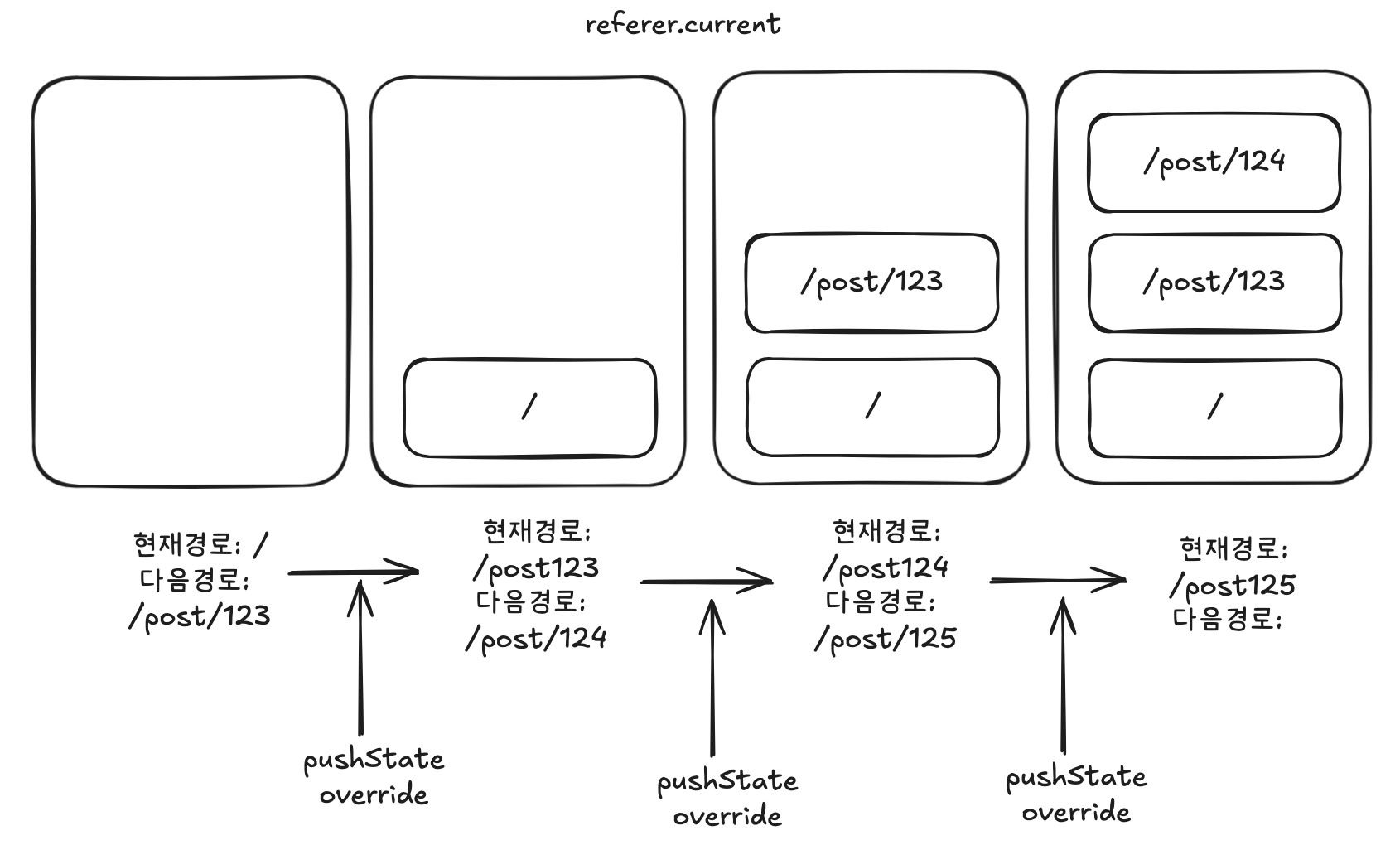
- 현재 경로는 / 이다. 아이디가 123인 게시글 주소로 라우팅 한다.
- pushState override 한 메소드에서 일어나는 일은 현재 경로를 리스트에 저장해둔다. 그리고 추후 replaceState에서 레퍼러를 다루기 위한 현재값도 설정한다.
1referer.current.push(window.location.href);
2currentUrl.current = window.location.origin + (url as string);
3orgPushState(data, unused, url);
- 페이지가 랜딩 후 현재 경로는 post/123 이고 레퍼러 리스트에는 pushState를 실행하며 넣어두었던 레퍼러 리스트가 있다. 레퍼러 리스트의 맨 마지막 요소가 레퍼러가 된다.
1const getReferer = useRef(() => {
2  if (referer.current.length <= 0) return '';
3  return referer.current.slice(-1)[0];
4});
replaceState#
replaceState 또한 세번째 파라미터로 다음 랜딩할 타겟의 주소가 들어온다.
replaceState 동작을 도식화하면 아래와 같다.
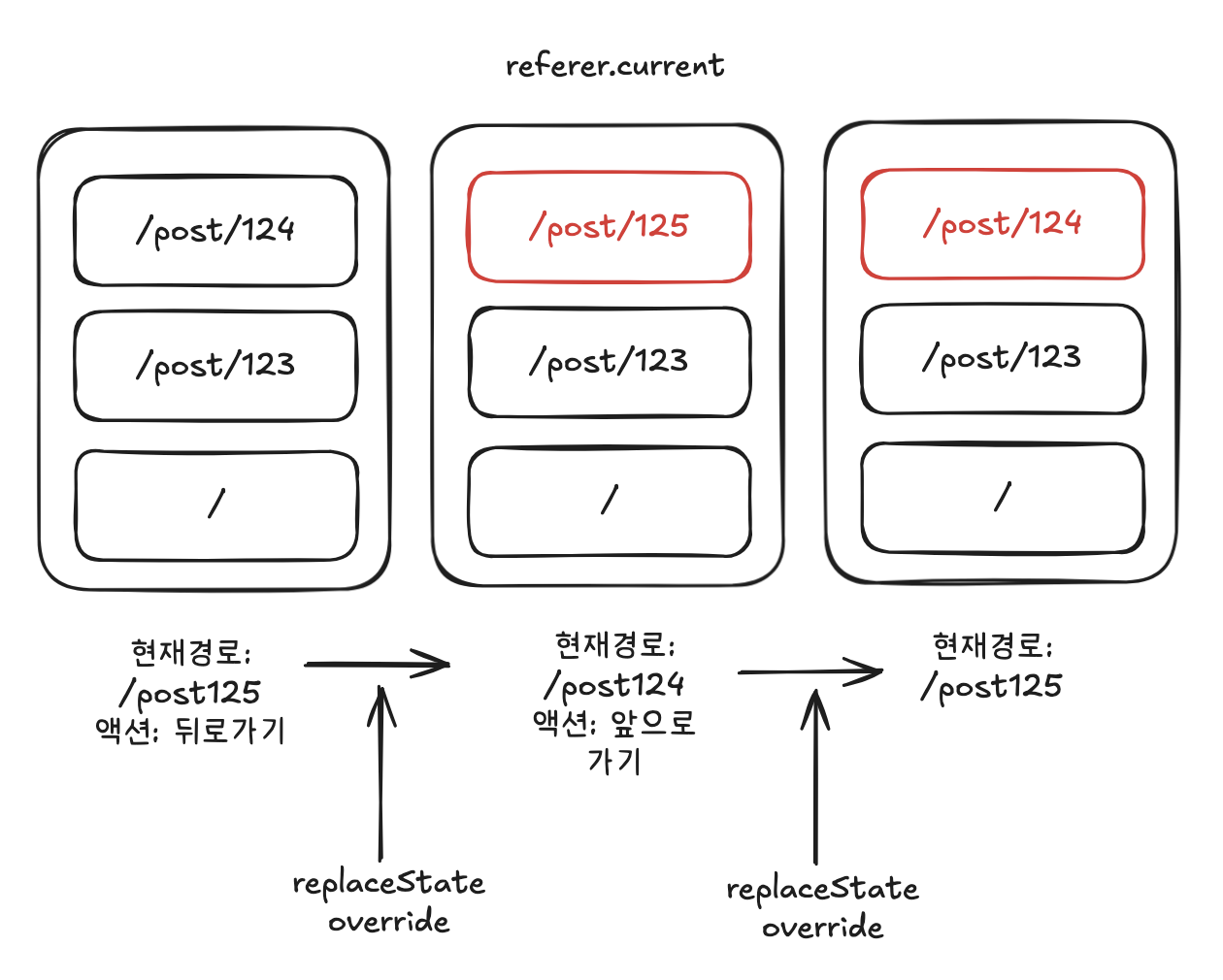
- 현재경로는 post/125 이다. 뒤로가기, 앞으로가기 액션 발생 시 replaceState가 호출된다.
- pushState를 진행하면서 현재 경로를 저장한 값을 레퍼러 리스트 맨 마지막 요소로 대체(replace)한다. 즉 위 그림의 빨간색 값은 pushState를 진행하면서 저장한 현재 주소 값인 것이다.
1referer.current[referer.current.length - 1] = currentUrl.current as string;
2currentUrl.current = window.location.origin + (url as string);
3orgReplaceState(data, unused, url);
테스트#
테스트 코드는 실제 서비스와 유사하게 작성되어 임의의 통계 서버주소(api/stat)로 보내는 것을 테스트 한 것이다. 여기서 레퍼러 값을 얻는데 있어 컴포넌트 마운트 직후 useEffect 내부에서 값을 다룬다.
1import { test, expect, type Page } from '@playwright/test';
2
3test('레퍼러 테스트', async ({ page }) => {
4  await page.goto('/dynamic/22');
5  expect(await page.getByTestId('referer').innerText()).toBe('');
6
7  await page.getByRole('link', { name: /다음 페이지 이동\s*\d+/ }).click();
8  await expect(page).toHaveURL('http://localhost:3000/dynamic/23');
9  expect(await page.getByTestId('referer').innerText()).toBe('http://localhost:3000/dynamic/22');
10
11  await page.getByRole('link', { name: /다음 페이지 이동\s*\d+/ }).click();
12  await expect(page).toHaveURL('http://localhost:3000/dynamic/24');
13  expect(await page.getByTestId('referer').innerText()).toBe('http://localhost:3000/dynamic/23');
14
15  await page.getByRole('link', { name: /다음 페이지 이동/ }).click();
16  await expect(page).toHaveURL('http://localhost:3000/dynamic/25');
17  expect(await page.getByTestId('referer').innerText()).toBe('http://localhost:3000/dynamic/24');
18
19  await page.getByRole('button', { name: /뒤로/ }).click();
20  await expect(page).toHaveURL('http://localhost:3000/dynamic/24');
21  expect(await page.getByTestId('referer').innerText()).toBe('http://localhost:3000/dynamic/25');
22
23  await page.getByRole('button', { name: /뒤로/ }).click();
24  await expect(page).toHaveURL('http://localhost:3000/dynamic/23');
25  expect(await page.getByTestId('referer').innerText()).toBe('http://localhost:3000/dynamic/24');
26
27  await page.getByRole('button', { name: /앞으로/ }).click();
28  await expect(page).toHaveURL('http://localhost:3000/dynamic/24');
29  expect(await page.getByTestId('referer').innerText()).toBe('http://localhost:3000/dynamic/23');
30
31  await page.getByRole('button', { name: /클릭 통계 버튼/ }).click();
32});
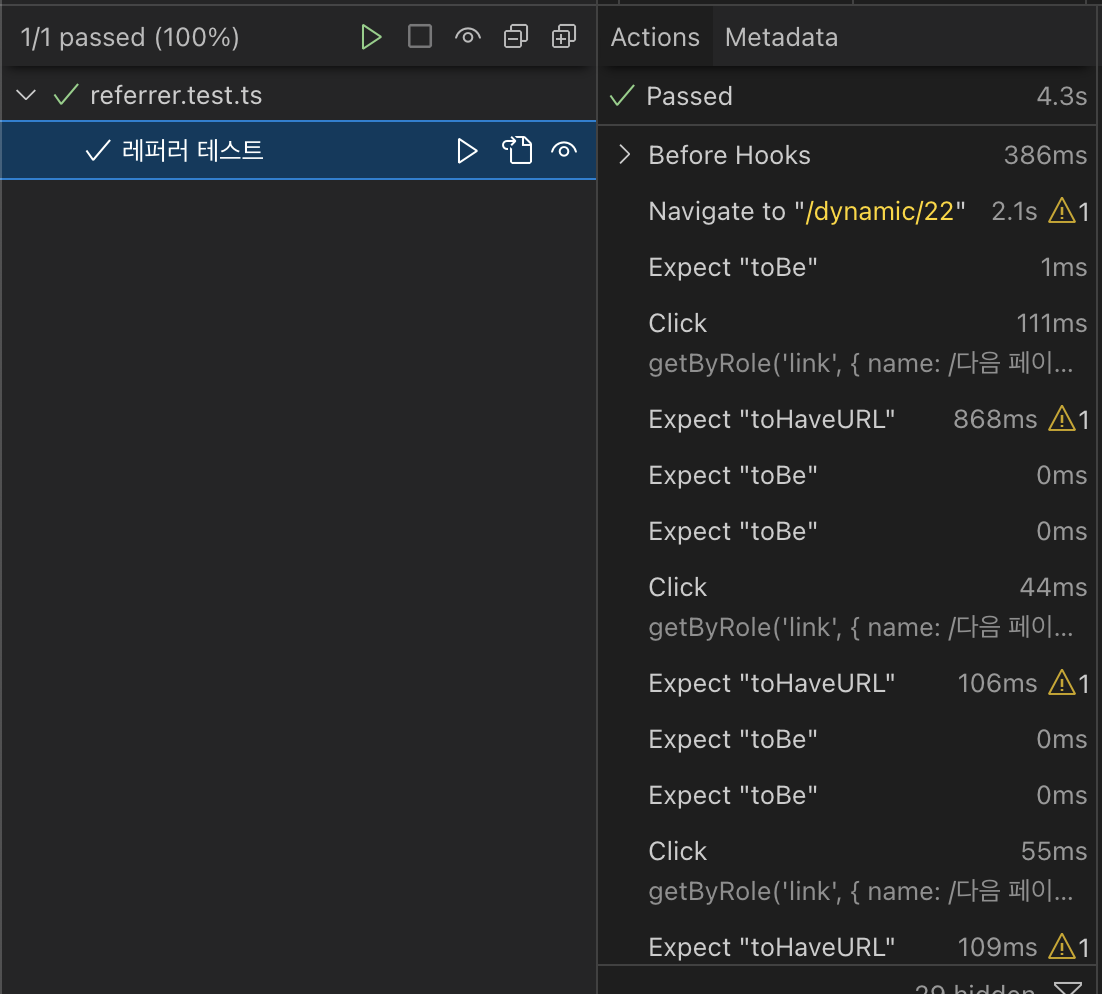
주의#
정확한 레퍼러 값을 얻기위해 useEffect 내부에서 실행해야 한다. 레퍼러 값을 다루는 오버라이드 로직은 useEffect 내부애서 실행되기에 컴포넌트 루트 스코프에서 값을 그대로 가져오려 하는경우 정확한 값을 얻을 수 없다.