Next App router 개발단계에서 린터를 이용해 호환성 검사하기
링크
npm: https://www.npmjs.com/package/eslint-plugin-next-compat
github: https://github.com/dkpark10/eslint-plugin-next-compat
개요
기존 뉴스 서비스를 Next15 App router로 마이그레이션 해야 하는 업무를 맡았습니다.
유저들은 저사양 디바이스 또는 구버전 브라우저를 사용하는 경우가 제법 있었지만 Next15 버전이 구버전 브라우저까지 폭넓게 지원하고 있었습니다. https://nextjs.org/docs/15/architecture/supported-browsers
하지만 개발단계에서 미리 호환성을 검사한다면 추후 테스트나 QA 시 호환성 이슈로 인한 재작업 비용을 줄일 수 있고 특정 API나 문법이 지원되지 않아 화면이 깨지거나 동작하지 않는 상황이 실제 사용자에게 노출되기 전에 차단할 수 있습니다.
eslint-plugin-compat#
필자가 당시 사용했던 린트 설정은 대략 아래와 같습니다.
1// eslint.config.mjs
2import compat from "eslint-plugin-compat";
3import getClientFileList from "./get-client-files"
4
5export default [
6  {
7    files: getClientFileList(),
8    plugins: {
9      compat
10    },
11    rules: {
12      "compat/compat": "error"
13    },
14    settings: {
15      polyfills: [
16        "Promise",
17      ]
18    },
19  }
20];
호환성 검사를 어떻게 할지 구현할 필요 없이 이미 시중에 브라우저 호환성을 검사해주는 eslint-plugin-compat이 존재했습니다. eslint-plugin-compat은 https://github.com/mdn/browser-compat-data 을 기반으로 브라우저 호환성을 검사해주는 린트 플러그인입니다.
결국 플러그인 속성에 해당 compat 플러그인을 주입하고 files속성에 클라이언트 파일만 추출하여 넣으면 해당 플러그인이 개발자가 명시한 파일들만 검사할 수 있게 됩니다.
get-client-files.js#
링크: https://github.com/dkpark10/eslint-plugin-next-compat/blob/master/src/get-client-files.js
서버 환경과 클라이언트 환경이 혼재되어 있는 Next App router 환경에서는 클라이언트 환경에서 실행될 파일들을 추출하는 것이 무엇보다 중요합니다. 파일들을 잘못 추출할 시 서버 런타임 환경에 실행되는 파일을 린트가 검사하여 개발자에게 혼돈을 줄 수 있습니다.
먼저 클라이언트 파일 즉 아래 이미지처럼 파란색 컴포넌트들만 추출할 수 있을까요?
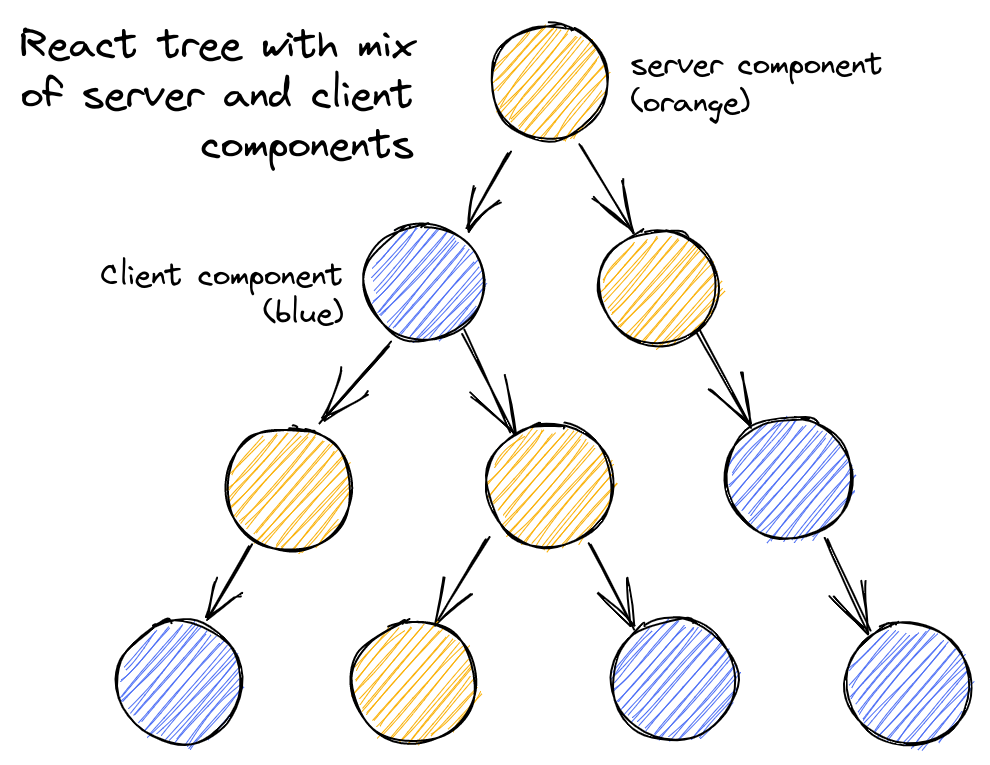
아래와 같이 기준을 제시할 수 있겠습니다.
11. 루트 폴더에서 `app/*` 또는 `src/app/*` 내에 모든 .tsx|.jsx 파일
2
32. 'use client' 디렉티브가 명시되어 있는 .tsx|.jsx 파일
4
53. 2번에서 찾은 컴포넌트 파일들이 의존하고 있는 모든 모듈 파일
6
74. 클라이언트 파일이 의존하고 있는 모듈이지만 'use server' 디렉티브가 명시되어 있지 않은 파일
생각보다 간단합니다. 위 기준을 바탕으로 한다면 아래와 같은 엣지 케이스도 판별가능합니다.
11. 클라이언트 파일이 의존하지만 'use client'가 명시되어 있지 않은 파일
2
32. onDemand 형식으로 'lazy load' 하는 클라이언트 파일
의존성을 추적하기 위해 dependency-tree 라이브러리를 사용하였습니다. 전체 로직은 아래와 같습니다. 위 4가지 근거에 매칭하는 로직들은 주석으로 표시해두었습니다.
1// get-client-files.js
2import { globSync } from 'glob';
3import fs from 'fs';
4import path from 'path';
5import dependencyTree from 'dependency-tree';
6
7function hasDirective(content, directive) {
8  for (const line of content.split('\n')) {
9    const trimmed = line.trim();
10
11    if (!trimmed || trimmed.startsWith('//') || trimmed.startsWith('*')) {
12      continue;
13    }
14
15    const normalized = trimmed.replace(/;$/, '');
16    return normalized === `'${directive}'` || normalized === `"${directive}"`;
17  }
18  return false;
19}
20
21function detectAppDir(cwd) {
22  const candidates = ['src/app', 'app'];
23  for (const dir of candidates) {
24    const fullPath = path.resolve(cwd, dir);
25    if (fs.existsSync(fullPath)) {
26      return dir;
27    }
28  }
29  return null;
30}
31
32export function getClientFiles(options = {}) {
33  const {
34    cwd = process.cwd(),
35    tsConfigPath = 'tsconfig.json',
36  } = options;
37
38  // src/app/* 또는 app/* 을 판별하기 위한 app folder 루트 진입점
39  const appDir = options.appDir ?? detectAppDir(cwd);
40
41  if (!appDir) {
42    return [];
43  }
44
45  try {
46    const srcPath = path.resolve(cwd, appDir);
47
48    // tsConfig 에서 path alias를 설정한경우 이를 dependency-tree가 해석하기 위한 tsconfig path
49    const tsConfigFullPath = path.resolve(cwd, tsConfigPath);
50
51    // 1. 루트 폴더에서 app/* 또는 src/app/* 내에 모든 .tsx|.jsx 파일
52    const componentFiles = globSync(`${srcPath}/**/*.{tsx,jsx}`, {
53      ignore: ['**/node_modules/**'],
54    });
55
56    if (componentFiles.length === 0) {
57      return [];
58    }
59
60    const JS_EXTENSIONS = /\.(tsx?|jsx?|mjs|cjs)$/;
61
62    function getDependencies(fileList) {
63      return fileList.reduce((acc, filePath) => {
64        try {
65          const deps = dependencyTree.toList({
66            filename: filePath,
67            directory: cwd,
68            filter: (depPath) =>
69              !depPath.includes('node_modules') && JS_EXTENSIONS.test(depPath), // 오직 JS_EXTENSIONS만 추출한다.
70            tsConfig: fs.existsSync(tsConfigFullPath) ? tsConfigFullPath : undefined,
71          });
72          return [...acc, ...deps];
73        } catch {
74          return acc;
75        }
76      }, /** @type {string[]} */ ([]));
77    }
78
79    const allDependencies = getDependencies(componentFiles);
80
81    // 2. 'use client' 디렉티브가 명시되어 있는 .tsx|.jsx 파일
82    const clientFiles = allDependencies.filter((filePath) => {
83      try {
84        const content = fs.readFileSync(filePath, 'utf-8');
85        return hasDirective(content, 'use client');
86      } catch {
87        return false;
88      }
89    });
90
91    // 3. 2번에서 찾은 컴포넌트 파일들이 의존하고 있는 모든 모듈 파일
92    const clientDependencies = getDependencies(clientFiles);
93
94    // 중복제거
95    // 4. 클라이언트 파일이 의존하고 있는 모듈이지만 'use server' 디렉티브가 명시되어 있지 않은 파일
96    const uniqueFiles = [...new Set(clientDependencies)].filter((filePath) => {
97      try {
98        const content = fs.readFileSync(filePath, 'utf-8');
99        return !hasDirective(content, 'use server');
100      } catch {
101        return true;
102      }
103    });
104
105    return uniqueFiles.map((filePath) => {
106      return path.relative(cwd, filePath);
107    });
108  } catch (err) {
109    console.error('get-client-files error:', err);
110    return [];
111  }
112}
플러그인 만들기#
위에 필자가 설정했던 린트 설정이 기억나시나요?
1// eslint.config.mjs
2import compat from "eslint-plugin-compat";
3import getClientFileList from "./get-client-files"
4
5export default [
6  {
7    files: getClientFileList(),
8    plugins: {
9      compat
10    },
11    rules: {
12      "compat/compat": "error"
13    },
14    settings: {
15      polyfills: [
16        "Promise",
17      ]
18    },
19  }
20];
결국 린트 플러그인으로 모듈화 하는 작업은 그저 위 설정을 한번 래핑하는 것이 끝입니다.
eslint-plugin-compat 을 재사용하면서 앞서 작성한 클라이언트 추출 코드만 files에 넣는 식입니다. 또한 eslint-plugin-compat 이 제공하는 polyfills, target 옵션도 호환이 되도록 만들어야 겠습니다.
링크: https://github.com/dkpark10/eslint-plugin-next-compat/blob/master/src/index.js
1// index.js
2import { globSync } from "glob";
3import { minimatch } from "minimatch";
4import { getClientFiles } from "./get-client-files.js";
5import { getBrowserslist, getNextVersion } from "./get-browserslist.js";
6import compatPlugin from "eslint-plugin-compat";
7const { name, version } = require("../package.json");
8
9const PLUGIN_NAME = name.replace("eslint-plugin-", "");
10
11function getDocsUrl() {
12  const nextVersion = getNextVersion();
13  if (nextVersion && nextVersion >= 15) {
14    return `https://nextjs.org/docs/${nextVersion}/architecture/supported-browsers`;
15  }
16  return "https://nextjs.org/docs/architecture/supported-browsers";
17}
18
19const plugin = {
20  meta: {
21    name,
22    version,
23  },
24
25  rules: {
26    compat: {
27      meta: {
28        ...compatPlugin.rules.compat.meta,
29        docs: {
30          ...compatPlugin.rules.compat.meta.docs,
31          url: getDocsUrl(),
32        },
33      },
34      create(context) {
35        const sourceCode = context.getSourceCode?.() ?? context.sourceCode;
36        const { body } = sourceCode.ast;
37        const hasUseServer = body.some(
38          (node) =>
39            node.type === 'ExpressionStatement' &&
40            node.expression.type === 'Literal' &&
41            node.expression.value === 'use server',
42        );
43        if (hasUseServer) return {};
44        return compatPlugin.rules.compat.create(context);
45      },
46    },
47  },
48  configs: {},
49};
50
51function getTargetFiles(include, exclude) {
52  const additionalFiles =
53    include?.flatMap((pattern) =>
54      globSync(pattern, { ignore: ["**/node_modules/**"] }),
55    ) ?? [];
56
57  const allFiles = [...new Set([...getClientFiles(), ...additionalFiles])];
58
59  const filteredFiles = exclude?.length
60    ? allFiles.filter(
61        (file) => !exclude.some((pattern) => minimatch(file, pattern)),
62      )
63    : allFiles;
64
65  return filteredFiles.length > 0 ? filteredFiles : ["__no_client_files__"];
66}
67
68function createConfig(severity, options) {
69  const targetFiles = getTargetFiles(options?.include, options?.exclude);
70  const browserslist = getBrowserslist();
71
72  const config = {
73    name: `${PLUGIN_NAME}/${severity === "warn" ? "recommended" : "strict"}`,
74    files: targetFiles,
75    plugins: {
76      [PLUGIN_NAME]: plugin,
77    },
78    rules: {
79      [`${PLUGIN_NAME}/compat`]: severity,
80    },
81  };
82
83  if (browserslist) {
84    config.settings = {
85      targets: browserslist,
86    };
87  }
88
89  return [config];
90}
91
92function createConfigFunction(severity) {
93  const fn = (options) => createConfig(severity, options);
94
95  fn[Symbol.iterator] = function* () {
96    yield* createConfig(severity);
97  };
98
99  return fn;
100}
101
102Object.assign(plugin.configs, {
103  recommended: createConfigFunction("warn"),
104  strict: createConfigFunction("error"),
105});
106
107export { plugin };
108export default plugin;
핵심 로직은 바로 여기입니다. 해당 플러그인은 그저 eslint-plugin-compat의 재사용이기에 create 함수에서 그대로 사용하면 됩니다.
ESLint 규칙에서 create(context) 함수는 린트가 파일을 분석할 때 실행되는 진입점입니다.
context 는 ESLint가 주입하는 객체로 현재 파일의 소스코드와 AST(context.sourceCode), 린트 에러를 발생시키는 함수 context.report, 현재 분석 중인 파일 경로 context.filename 등의 정보를 담고 있습니다.
create의 반환값은 AST 노드 방문자(visitor) 객체입니다. ESLint가 AST를 순회하면서 해당 노드를 만나면 등록된 함수를 호출합니다.
1create(context) {
2  return {
3    // CallExpression 노드를 만날 때마다 실행
4    CallExpression(node) {
5      context.report({ node, message: "에러 메시지" });
6    }
7  };
8}
분석한 추상구문 트리에서 뽑아낸 body에 각 타입을 간단히 설명드리겠습니다. type === ExpressionStatement 은 완전한 하나의 구문(Statement)을 나타내는 노드 타입입니다. 예를들어 아래와 같습니다.
1A function call: console.log("hello world");
2
3An assignment: a = b;
node.expression.type === 'Literal' 에서 Literal은 소스코드에 직접 작성된 정적인 값을 나타내는 AST 노드 타입입니다.
문자열 use server, 숫자 42, 불리언 true 같은 값들이 해당됩니다.
즉 use server가 단독으로 쓰인 경우 AST는 아래처럼 생겼습니다.
1ExpressionStatement        ← 완전한 구문 (세미콜론으로 끝나는 statement)
2  └─ expression: Literal   ← 정적 값 (문자열 리터럴)
3       ├─ value: 'use server'
4       └─ raw: "'use server'"
node.expression.value 는 그 리터럴의 실제 값으로, 여기서는 'use server' 문자열과 비교하는 데 사용됩니다.
아래 로직은 추상구문트리를 분석하여 use server 디렉티브가 최상단에 위치해있는지를 판별합니다.
존재한다면 빈 객체 를 반환하여 린트가 해당 파일을 검사하지 않고 넘어갑니다. 그러지 않을 경우 기존 compatPlugin.rules.compat.create(context) 를 반환합니다.
1import compatPlugin from "eslint-plugin-compat";
2
3const plugin = {
4  meta: {
5    name,
6    version,
7  },
8
9  rules: {
10    compat: {
11      meta: {
12        ...compatPlugin.rules.compat.meta,
13        docs: {
14          ...compatPlugin.rules.compat.meta.docs,
15          url: getDocsUrl(),
16        },
17      },
18      create(context) {
19        const sourceCode = context.getSourceCode?.() ?? context.sourceCode;
20        const { body } = sourceCode.ast;
21        const hasUseServer = body.some(
22          (node) =>
23            node.type === 'ExpressionStatement' &&
24            node.expression.type === 'Literal' &&
25            node.expression.value === 'use server',
26        );
27        if (hasUseServer) return {};
28        return compatPlugin.rules.compat.create(context);
29      },
30    },
31  },
32  configs: {},
33};
결과#
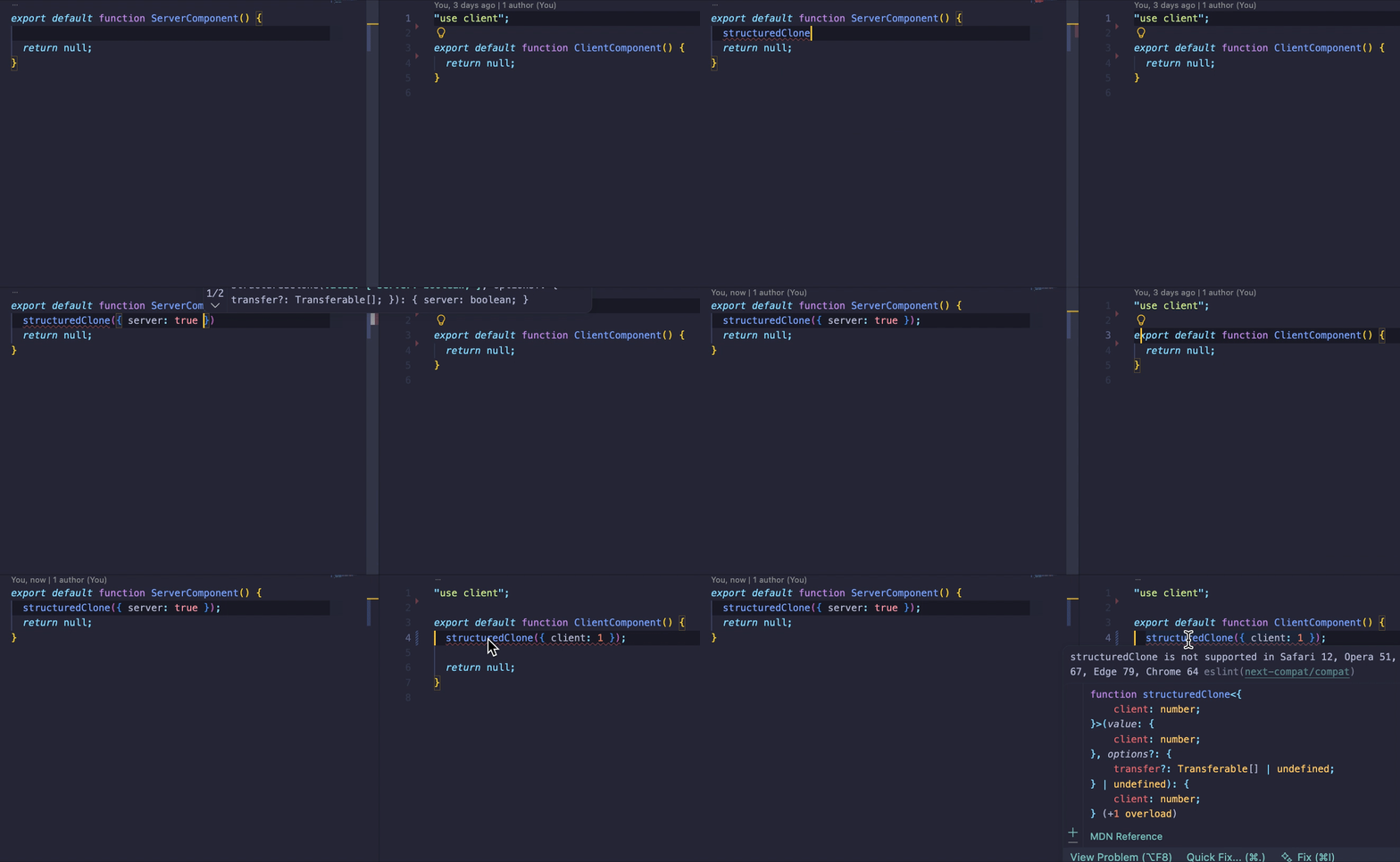
해당 데모는 Next15 버전 https://nextjs.org/docs/15/architecture/supported-browsers을 브라우저 타겟으로 하여 실시한 데모입니다.
서버 컴포넌트는 브라우저 호환성을 신경쓰지 않아도 되므로 린트가 검사하지 않습니다.
클라이언트 컴포넌트는 브라우저에서 동작하므로 린트가 검사합니다.
한계#
barrel index 패턴을 사용할 경우 모든 의존성 파일을 검사하므로 서버 런타임 코드를 린터가 검사할 수 있습니다. 당장 어떻게 고칠지 생각이 떠오르지만 추후 개발할지 아니면 옵션을 제공하는 형태로 노출할지 생각해 봐야 겠습니다.
1// page.jsx
2
3import { serverLogic } from '@/utils/index';
4
5export default function ServerComponent() {
6  // 생략
7}
1// utils/index.js
2
3// 의존성 트리를 순회하면서 서버 로직까지 들어감
4export * from './client-logic'
5export * from './server-logic'