밑바닥부터 구현해보는 UI라이브러리 만들기1 (상태)
예제링크
npm 링크: https://www.npmjs.com/package/reona
프로젝트 링크: https://github.com/dkpark10/reona
해당 게시글에 관한 링크: https://github.com/dkpark10/reona-track/tree/master/track/01-state
아키텍처 설계#
인터페이스는 react와 동일하게 함수형 컴포넌트로 작성한다. 데이터 상태 변경에 따른 간단한 카운터 예제를 작성해본다.
1import { html, state } from '../core';
2
3export default function Counter() {
4  const data = state({
5    count: 0,
6  });
7
8  const increase = () => {
9    data.count += 1;
10  }
11
12  const decrease = () => {
13    data.count -= 1;
14  }
15
16  return html`
17    <div id="app">
18      <button type="button" @click=${increase}>increase</button>
19      <button type="button" @click=${decrease}>decrease</button>
20      <div>${data.count}</div>
21    </div>
22  `;
23}
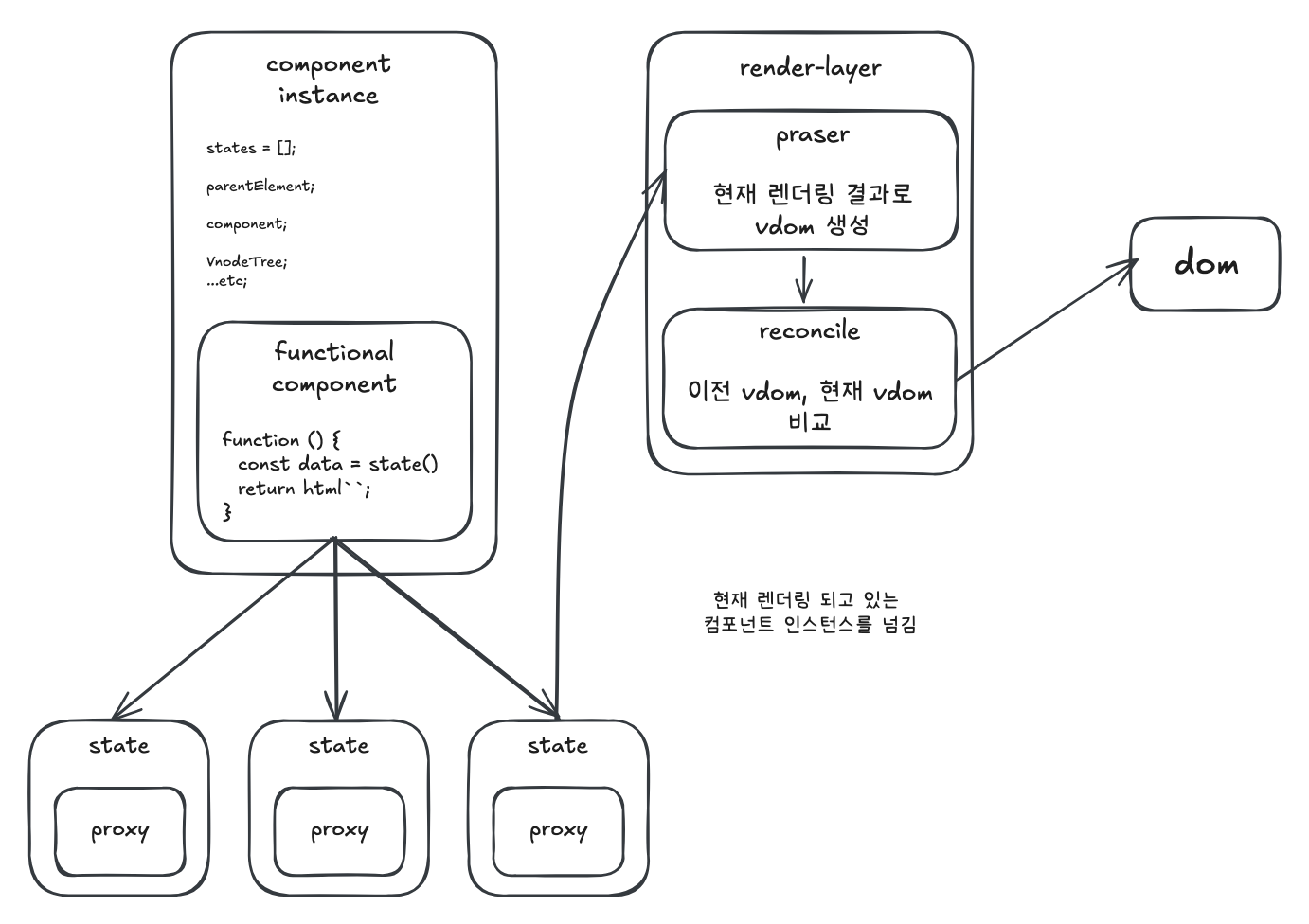
함수형 컴포넌트의 경우 렌더링 시 매번 함수를 호출하기에 해당 컴포넌트의 상태, props, vdom, 라이프 사이클 등
이를 관리해야 할 별도의 인스턴스가 필수적이다. 어찌보면 react class component와 비슷하다 볼 수 있다. 본 프로젝트에서는 이를 ComponentInstance 객체로 구현한다. 아래 이미지는 해당 프로젝트의 전체 구성도이다.
전체 순서#
11. 함수형 컴포넌트를 가지고와 인스턴스를 생성한다.
2
32. 함수형 컴포넌트의 반환값을 가지고 Vdom을 생성한다.
4
53. Vdom을 가지고 실제 dom을 생성한다.
6
74. 실제 dom을 브라우저에 부착한다.
8
95. 상태 업데이트 시 이전 Vdom과 현재 VDom을 가지고 비교하여 실제 dom을 업데이트 한다.
컴포넌트가 실제 dom에 반영되려면 루트 엘리먼트로부터 컴포넌트가 부착되어야 한다. 루트 엘리먼트와 해당 컴포넌트를 rootRender 함수에 넘긴다.
1rootRender(document.getElementById('root'), Counter);
runtime-dom.js
1// 부착할 엘리먼트와 함수형 컴포넌트를 파라미터로 넘김
2function rootRender(
3  container,
4  component,
5) {
6  const instance = new ComponentInstance(component, 0); // 컴포넌트를 관리할 인스턴스 생성
7  instance.render(container);
8  return instance;
9}
ComponentInstance를 생성하기 위한 생성자 옵션으로 컴포넌트 함수와 html 트리에서의 고유 위치 넘버링을 넘긴다. 루트 엘리먼트에 첫 부착되므로 0으로 넘긴다. 함수 컴포넌트 반환값의 경우 html 함수와 함께 렌더링할 선언적 dom 데이터를 넘겨주는데 html 함수는 문자열과 동적인 값을 넘겨주고 marker를 표시한채 그대로 넘긴다.
이는 웹 컴포넌트 기반 라이브러리 lit에서 컨셉을 차용했다.
즉 html 함수의 역할은 추후 가상돔을 생성할 때 문자열에 표시된 marker에 동적값을 주입할 문자열 템플릿을 반환하는 것이다.
1function html(strings, ...values) {
2  let idx = 0;
3  const rawString = strings
4    .join('%%identifier%%')
5    .replace(/%%identifier%%/g, () => `__marker_${idx++}__`);
6
7  return { template: rawString, values };
8}
html 함수의 반환 값
1html`
2  <div id="app">
3    <button type="button" @click=${increase}>increase</button>
4    <button type="button" @click=${decrease}>decrease</button>
5    <div>${data.count}</div>
6  </div>
7`;
8
9// 결과
10
11{
12  template:
13    <div id="app">
14      <button type="button" data-testid="increase" @click=__marker_0__>increase</button>
15      <button type="button" data-testid="decrease" @click=__marker_1__>decrease</button>
16      <div id="value">__marker_2__</div>
17    </div>,
18
19  values: [f, f, 0],
20}
컴포넌트 인스턴스#
함수형 컴포넌트를 관리할 컴포넌트 인스턴스를 만든다. 인스턴스가 하는일은 다음과 같다.
11. 함수형 컴포넌트 원본과 상태를 보관
22. 렌더링 시 현재 인스턴스를 전역에 할당 (훅이 접근할 수 있도록)
33. VNode 생성 → 실제 DOM 생성 → 부모에 삽입
44. 리렌더링 시 새 DOM으로 교체
component-instance.js
1export default class ComponentInstance {
2  states = [];        // 상태를 관리할 훅 배열
3  parentElement;      // DOM이 삽입될 부모 엘리먼트
4  component;          // 함수형 컴포넌트 원본
5  prevVnodeTree;      // 이전 렌더링의 VNode
6  nextVnodeTree;      // 현재 렌더링의 VNode
7  currentDom;         // 실제 마운트된 DOM
8  sequence;           // 트리에서의 위치 (전위순회 기준)
9  hookIndex = 0;      // 훅 포인터 (마운트 전)
10  hookLimit = 0;      // 훅 최대 개수 (마운트 후 고정)
11  stateHookIndex = 0; // 상태 훅 포인터
12  isMounted = false;  // 마운트 여부
13
14  constructor(component, options) {
15    this.component = component;
16    this.sequence = options.sequence;
17  }
18}
render 메서드 - 초기 마운트
컴포넌트를 처음 DOM에 부착할 때 호출된다.
1render(parentElement, isRerender) {
2  if (isRerender) {
3    this.stateHookIndex = 0;
4  }
5
6  // 1. 현재 렌더링 중인 인스턴스를 전역에 할당
7  currentInstance = this;
8
9  // 2. 컴포넌트 함수 실행 → 템플릿 반환
10  const template = this.component();
11
12  this.parentElement = parentElement;
13
14  // 3. 템플릿 → VNode 트리로 파싱
15  this.prevVnodeTree = parse(template, this.sequence + 1);
16
17  // 4. VNode → 실제 DOM 생성
18  this.currentDom = createDOM(this.prevVnodeTree, parentElement);
19
20  // 5. 부모에 DOM 삽입
21  parentElement.insertBefore(this.currentDom, null);
22  this.isMounted = true;
23}
reRender 메서드 - 상태 변경 시 재렌더링
상태가 변경되면 호출되어 DOM을 교체한다.
1reRender() {
2  this.stateHookIndex = 0;
3
4  // 1. 현재 렌더링 중인 인스턴스를 전역에 할당
5  currentInstance = this;
6
7  // 2. 컴포넌트 함수 재실행
8  const template = this.component();
9
10  // 3. 새로운 VNode 트리 생성
11  this.nextVnodeTree = parse(template, this.sequence + 1);
12
13  // 4. 새 DOM 생성
14  const newDom = createDOM(this.nextVnodeTree, this.parentElement);
15
16  // 5. 기존 DOM을 새 DOM으로 일괄 교체
17  this.currentDom.replaceWith(newDom);
18
19  // 6. 참조 업데이트
20  this.currentDom = newDom;
21  this.prevVnodeTree = this.nextVnodeTree;
22}
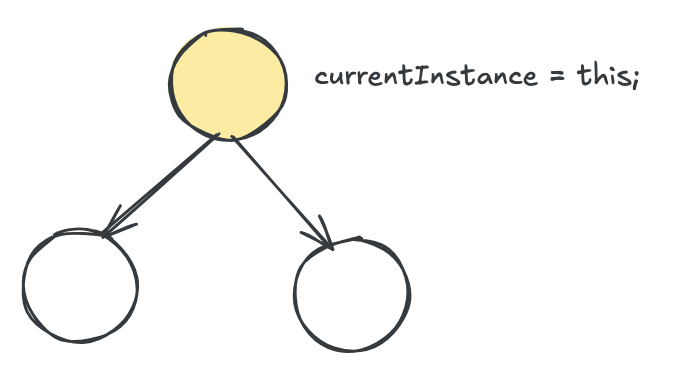
핵심: currentInstance 전역 할당#
여기서 가장 중요한 로직은 현재 렌더링 중인 인스턴스를 전역에 할당하는 것이다. 이를 통해 훅 함수 내부 실행 시 현재 렌더링 진행중인 컴포넌트를 확인할 수 있다.
1currentInstance = this;
2const template = this.component();
React 역시 렌더링 중인 Fiber 정보를 전역 변수에 등록하여 훅이 현재 실행 중인 컴포넌트를 추적한다.
hook 로직 작성하기#
state 훅이 하는 일은 다음과 같다.
11. 현재 렌더링 중인 인스턴스 가져오기 (어떤 컴포넌트에서 호출되었는지 파악)
22. 훅 유효성 검사 (조건부 호출 방지)
33. 리렌더링 시 이전 상태값 반환 (초기값이 아닌 저장된 값)
44. Proxy로 반응형 상태 생성 (값 변경 시 자동 리렌더링)
Proxy vue의 반응성 컨셉을 사용하였으며 구현 단순화를 위해 Proxy 기반 반응성을 사용한다.
1단계: 현재 인스턴스 가져오기#
컴포넌트 함수 실행 전에 전역에 할당된 currentInstance를 가져온다. 이것이 React에서 훅이 컴포넌트 내부에서만 호출되어야 하는 이유다.
hooks.js
1import  { getCurrentInstance } from './component-instance';
2
3function checkInvalidHook(currentInstance) {
4  if (currentInstance.isMounted && currentInstance.hookIndex > currentInstance.hookLimit) {
5    throw new Error('훅은 함수 최상단에 선언해야 합니다.');
6  }
7
8  if (!currentInstance.isMounted) {
9    currentInstance.hookIndex += 1;
10  }
11}
12
13export function state(initial) {
14  const currentInstance = getCurrentInstance();
15
16  // 컴포넌트 외부에서 호출하면 에러
17  if (currentInstance === null) {
18    throw new Error('state 함수는 컴포넌트 내에서 선언해야 합니다.');
19  }
20  // ...생략
21}
2단계: 훅 유효성 검사#
마운트 시점에 훅 개수를 기록해두고, 리렌더링 시 그 개수를 초과하면 에러를 던진다.
이것이 실제 react에서도 훅을 조건부로 호출할 수 없는 이유다.
1function checkInvalidHook(currentInstance) {
2  // 마운트 후 훅 개수가 늘어나면 에러
3  if (currentInstance.isMounted && currentInstance.hookIndex > currentInstance.hookLimit) {
4    throw new Error('훅은 함수 최상단에 선언해야 합니다.');
5  }
6
7  // 마운트 전에는 훅 포인터 증가
8  if (!currentInstance.isMounted) {
9    currentInstance.hookIndex += 1;
10  }
11}
3단계: 이전 상태값 반환#
매 렌더링마다 state()가 호출되지만, 초기값이 아닌 이전에 저장된 상태를 반환해야 한다. stateHookIndex를 포인터로 사용해 states 배열에서 해당 순서의 상태를 가져온다.
1const stateIndex = currentInstance.stateHookIndex++;
2
3// 이미 상태가 있으면 그대로 반환 (리렌더링 시)
4if (currentInstance.states[stateIndex] !== undefined) {
5  return currentInstance.states[stateIndex];
6}
4단계: Proxy로 반응형 상태 생성#
초기 마운트 시에만 실행된다. Proxy의 set trap을 활용해 값 변경 시 자동으로 리렌더링을 트리거한다.
1const data = new Proxy(initial, {
2  get(target, key, receiver) {
3    return Reflect.get(target, key, receiver);
4  },
5
6  set(target, key, value, receiver) {
7    const prevValue = Reflect.get(receiver, key);
8    const result = Reflect.set(target, key, value, receiver);
9
10    // 값이 변경되면 리렌더링
11    if (prevValue !== value) {
12      currentInstance.reRender();
13    }
14    return result;
15  },
16});
17
18// 인스턴스의 states 배열에 저장
19currentInstance.states[stateIndex] = data;
20return data;
훅 포인터가 동작하는 방식#
아래와 같이 훅이 여러 개 있을 때 인스턴스 변수들이 어떻게 동작하는지 살펴보자.
1function Component() {
2  const data1 = state({ foo: 1 }); // stateIndex = 0
3  const data2 = state({ bar: 1 }); // stateIndex = 1
4  return ...
5}
마운트 이전
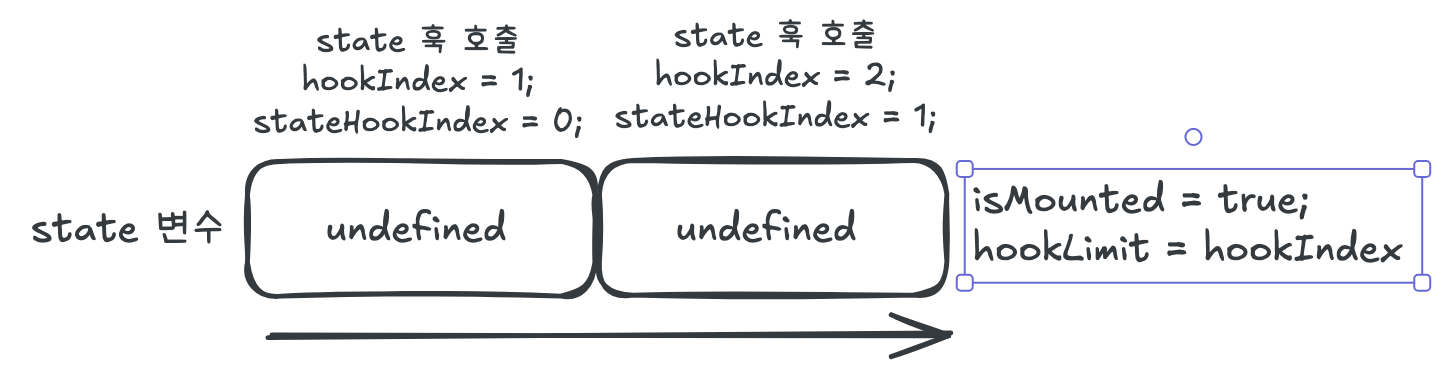
마운트 이전에는 훅을 순회하면서 포인터를 증가시키고, states 배열에 초기값을 세팅한다.
마운트 완료 후 hookLimit에 훅 개수를 저장하여 이후 추가 훅 호출을 방지한다.
마운트 이후 리렌더링
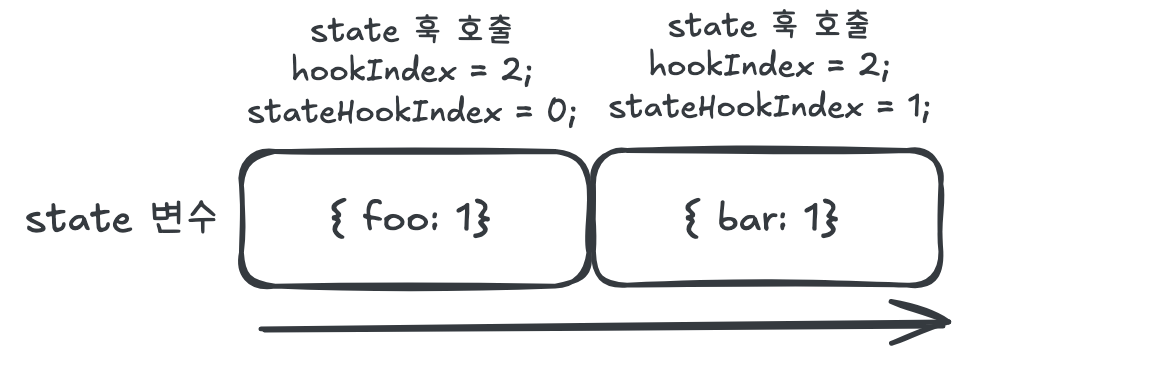
리렌더링 시에는 states 배열에 값이 이미 존재하므로 저장된 상태를 그대로 반환한다.
재조정 및 이벤트, 데이터 바인딩을 위한 Vdom 생성#
앞서 html 함수에서 받은 결과물을 이제 실제로 dom에 부착해야 하는 작업이 남았다. Vdom을 생성하는 parser를 작성한다.
파서의 전체 흐름#
파서가 하는 일을 단계별로 요약하면 다음과 같다.
11. template 문자열 → DOM으로 파싱 (브라우저 template 엘리먼트 활용)
22. DOM 노드 순회하면서 VNode로 변환 (convertNode, convertChild)
33. \_\_marker_N\_\_ 을 만나면 values 배열에서 실제 값으로 치환
44. 최종 VNode 트리 반환
marker 치환 과정 예시
1// 입력
2html`<button @click=${onClick}>${count}개</button>`
3
4// 1. html 함수 결과
5{
6  template: '<button @click=__marker_0__>__marker_1__개</button>',
7  values: [onClick, 5]
8}
9
10// 2. parse 결과 (VNode)
11{
12  type: 'element',
13  tag: 'button',
14  attr: { '@click': onClick },  // marker_0 → onClick 함수
15  children: [
16    { type: 'text', value: '5개' }  // marker_1 → 5
17  ]
18}
1단계: 템플릿을 DOM으로 변환#
html 함수에서 받은 template 문자열을 브라우저의 template 엘리먼트를 활용해 파싱한다. template 엘리먼트는 innerHTML에 문자열을 넣으면 자동으로 DOM 트리를 생성해준다.
parser.js
1export default function parse(renderResult) {
2  const { template: t } = renderResult;
3  const template = document.createElement('template');
4
5  template.innerHTML = t.trim();
6
7  // 루트 엘리먼트는 1개여야 한다
8  if (template.content.childNodes.length > 1) {
9    throw new Error('루트 엘리먼트는 1개여야 합니다.');
10  }
11
12  const firstChild = template.content.firstChild;
13
14  // 텍스트 노드라면
15  if (firstChild && firstChild.nodeType === Node.TEXT_NODE) {
16    return convertChild(firstChild);
17  }
18
19  return convertNode(template.content.firstElementChild);
20}
2단계: 엘리먼트 노드 변환 (convertNode)#
엘리먼트 노드를 VNode로 변환한다. 속성(attributes)을 순회하며 marker가 있으면 values 배열에서 실제 값을 가져온다.
1let valueIndex = 0;
2
3function convertNode(el) {
4  if (!el) {
5    return { type: 'text', value: '' };
6  }
7
8  const attrs = {};
9  for (const attr of el.attributes) {
10    const { values } = renderResult;
11
12    // marker 패턴 매칭
13    const markers = attr.value.match(/__marker_(\d+)__/g);
14    if (markers && markers.length >= 1) {
15      // 함수면 이벤트 핸들러로 할당
16      if (typeof values[valueIndex] === 'function') {
17        attrs[attr.name] = values[valueIndex++];
18      // 객체면 경고와 함께 할당
19      } else if (typeof values[valueIndex] === 'object') {
20        attrs[attr.name] = values[valueIndex++];
21      // 원시값이면 문자열로 치환
22      } else {
23        attrs[attr.name] = attr.value.replace(/__marker_(\d+)__/g, () => {
24          const v = values[valueIndex++];
25          return v !== undefined ? String(v) : '';
26        });
27      }
28    } else {
29      // marker가 없으면 그대로 할당
30      attrs[attr.name] = attr.value;
31    }
32  }
33
34  // 자식 노드들을 재귀적으로 변환
35  const children = [];
36  for (const child of el.childNodes) {
37    const vnode = convertChild(child);
38    if (vnode) {
39      children.push(vnode);
40    }
41  }
42
43  return {
44    type: 'element',
45    tag: el.tagName.toLowerCase(),
46    children,
47    attr: attrs,
48  };
49}
3단계: 텍스트/자식 노드 변환 (convertChild)#
텍스트 노드를 처리하고, marker가 있다면 실제 값으로 치환한다. 값이 또 다른 컴포넌트(renderResult 객체)라면 재귀적으로 parse를 호출한다.
1function convertChild(node) {
2  // 텍스트 노드 처리
3  if (node.nodeType === Node.TEXT_NODE) {
4    let text = node.textContent ?? '';
5    if (/^\s*$/.test(text)) return null; // 공백만 있으면 무시
6
7    const markers = text.match(/__marker_(\d+)__/g);
8    if (markers && markers.length >= 1) {
9      return markers.map(() => {
10        const { values } = renderResult;
11        const value = values[valueIndex];
12
13        // 값이 컴포넌트라면 재귀 파싱
14        if (isRenderResultObject(value)) {
15          return parse(value);
16        }
17
18        // 배열이면 각각 파싱
19        if (Array.isArray(value)) {
20          return values[valueIndex++].map((v) => {
21            if (isRenderResultObject(v)) {
22              return parse(v);
23            }
24          });
25        }
26
27        // 일반 값이면 텍스트로 치환
28        text = replaceMarkers(text);
29        return { type: 'text', value: text };
30      });
31    }
32
33    return { type: 'text', value: text };
34  }
35
36  // 엘리먼트 노드면 convertNode로 위임
37  if (node.nodeType === Node.ELEMENT_NODE) {
38    return convertNode(node);
39  }
40
41  return null;
42}
파싱 결과 예시
1const template = html`<div id="app" @click=${onClick}>${text}</div>`;
2const result = parse(template);
3
4// result
5{
6  type: 'element',
7  tag: 'div',
8  children: [ { type: 'text', value: 'text' } ],
9  attr: { id: 'app', '@click': [Function: onClick] }
10}
VNode를 실제 DOM으로 변환#
파싱된 VNode 트리를 실제 브라우저 DOM으로 변환한다.
createDOM이 하는 일#
- 텍스트 노드면 →
로 생성1document.createTextNode() - 엘리먼트 노드면 →
로 생성1document.createElement() - 속성 처리 →
같은 이벤트는1@click
, 나머지는1addEventListener1setAttribute - 자식 노드 재귀 처리 → children을 순회하며 createDOM 재귀 호출
runtime-dom.js
1export function createDOM(vnode, parentElement) {
2  // 1. 텍스트 노드 처리
3  if (vnode.type === 'text') {
4    return document.createTextNode(vnode.value);
5  }
6
7  // 2. 엘리먼트 생성
8  const el = document.createElement(vnode.tag);
9
10  // 3. 속성 처리
11  if (vnode.attr) {
12    for (const [key, value] of Object.entries(vnode.attr)) {
13      // @click 같은 이벤트 바인딩
14      if (/@([^\s=/>]+)/.test(key) && typeof value === 'function') {
15        const eventName = key.slice(1);
16        el.addEventListener(eventName, value);
17      } else {
18        el.setAttribute(key, value);
19      }
20    }
21  }
22
23  // 4. 자식 노드 재귀 처리
24  vnode.children?.forEach((child) => {
25    const c = createDOM(child, el);
26    if (c) {
27      el.appendChild(c);
28    }
29  });
30
31  return el;
32}
DOM 삽입과 교체#
생성한 DOM은 초기 렌더링 시 부모에 삽입하고, 리렌더링 시 기존 DOM을 교체한다.
1// 초기 렌더링: 부모에 삽입
2this.currentDom = createDOM(this.prevVnodeTree, this.parentElement);
3this.parentElement.insertBefore(this.currentDom, null);
4
5// 리렌더링: 기존 DOM을 새 DOM으로 일괄 교체
6const newDom = createDOM(this.nextVnodeTree, this.parentElement);
7this.currentDom.replaceWith(newDom);
렌더링 최적화#
현재 Proxy의 set trap은 속성이 변경될 때마다 리렌더링을 트리거한다. 여러 속성을 동시에 변경하면 그 횟수만큼 리렌더링이 발생한다.
1const data = state({ a: 0, b: 0 });
2
3const trigger = () => {
4  data.a += 1; // 리렌더링 1번
5  data.b += 1; // 리렌더링 2번 → 비효율!
6}
requestAnimationFrame으로 배치 처리#
대부분의 디스플레이 디바이스는 60Hz 주사율을 사용하므로 1프레임(약 16ms) 안에 발생한 모든 상태 변경을 모아서 한 번만 렌더링하면 된다.
requestAnimationFrame은 다음 프레임 직전에 콜백을 실행하므로, 같은 프레임 내의 여러 업데이트를 배치로 처리할 수 있다.
배치 업데이트 흐름
1data.a += 1  →  큐에 인스턴스 추가, RAF 예약
2data.b += 1  →  이미 큐에 있음, 무시
3─────────────────────────────────────────
4      ↓  (다음 프레임)
5
6RAF 콜백 실행 → 큐의 인스턴스들 한 번씩 리렌더링
update 함수 구현
1const renderQueue = new Set(); // 중복 방지를 위해 Set 사용
2let rafId = null;
3
4export function update(instance) {
5  // 1. 렌더링할 인스턴스를 큐에 추가
6  renderQueue.add(instance);
7
8  // 2. 이미 RAF가 예약되어 있으면 추가 예약 안 함
9  if (rafId !== null) return;
10
11  // 3. 다음 프레임에 배치 렌더링 예약
12  rafId = requestAnimationFrame(() => {
13    try {
14      // 큐에 있는 모든 인스턴스 렌더링
15      renderQueue.forEach((instance) => {
16        instance.reRender();
17      });
18    } finally {
19      // 정리
20      renderQueue.clear();
21      rafId = null;
22    }
23  });
24}
Proxy set trap에 적용
기존의 reRender() 직접 호출을 update() 함수로 교체한다.
1set(target, key, value, receiver) {
2  const prevValue = Reflect.get(receiver, key);
3  const result = Reflect.set(target, key, value, receiver);
4
5  if (prevValue !== value) {
6    // reRender() 대신 update()로 배치 처리
7    update(currentInstance);
8  }
9  return result;
10}
이제 같은 프레임 내에서 아무리 많은 상태를 변경해도 1번만 리렌더링된다.
전체 파일#
index.js
1import { state } from './hooks'
2
3/**
4 * @param {string[]} strings
5 * @param  {any[]} values
6 */
7function html(strings, ...values) {
8  let idx = 0;
9  const rawString = strings
10    .join('%%identifier%%')
11    .replace(/%%identifier%%/g, () => `__marker_${idx++}__`);
12
13  return { template: rawString, values };
14}
15
16export {
17  state, html
18};
hooks.js
1import  { getCurrentInstance } from './component-instance';
2
3const renderQueue = new Set();
4let rafId = null;
5
6export function update(instance) {
7  renderQueue.add(instance);
8
9  if (rafId !== null) return;
10
11  rafId = requestAnimationFrame(() => {
12    try {
13      renderQueue.forEach((instance) => {
14        instance.reRender();
15      });
16    } finally {
17      renderQueue.clear();
18      rafId = null;
19    }
20  });
21}
22
23function isPrimitive(value) {
24  return value === null || (typeof value !== 'object' && typeof value !== 'function');
25}
26
27function checkInvalidHook(currentInstance) {
28  if (currentInstance.isMounted && currentInstance.hookIndex > currentInstance.hookLimit) {
29    throw new Error('훅은 함수 최상단에 선언해야 합니다.');
30  }
31
32  if (!currentInstance.isMounted) {
33    currentInstance.hookIndex += 1;
34  }
35}
36
37export function state(initial) {
38  const currentInstance = getCurrentInstance();
39  if (currentInstance === null) {
40    throw new Error('state 함수는 컴포넌트 내에서 선언해야 합니다.');
41  }
42
43  checkInvalidHook(currentInstance);
44
45  const stateIndex = currentInstance.stateHookIndex++;
46  if (currentInstance.states[stateIndex] !== undefined) {
47    return currentInstance.states[stateIndex];
48  }
49
50  if (initial && isPrimitive(initial)) {
51    throw new Error('원시객체 입니다. 객체 형식으로 넣으세요.');
52  }
53
54  const data = new Proxy(initial, {
55    get(target, key, receiver) {
56      return Reflect.get(target, key, receiver);
57    },
58
59    set(target, key, value, receiver) {
60      const prevValue = Reflect.get(receiver, key);
61
62      const result = Reflect.set(target, key, value, receiver);
63      if (prevValue !== value) {
64        update(currentInstance);
65      }
66      return result;
67    },
68  });
69  currentInstance.states[stateIndex] = data;
70  return data;
71}
component-instance.js
1import parse from './parser';
2import { createDOM } from './runtime-dom';
3
4/** @description 현재 렌더링 되고 있는 컴포넌트 */
5let currentInstance = null;
6export function getCurrentInstance() {
7  return currentInstance;
8}
9
10/** @description 컴포넌트 인스턴스 - 상태, Props, 생명주기, VNode 트리, DOM 참조를 관리 */
11export default class ComponentInstance {
12  /** @type {Array<unknown>} */
13  states = [];
14
15  /** @type {HTMLElement | null} */
16  parentElement;
17
18  /** @type {Function} */
19  component;
20
21  /** @type {Object | null} */
22  prevVnodeTree;
23
24  /** @type {Object | null} */
25  nextVnodeTree;
26
27  /** @type {HTMLElement | null} */
28  currentDom;
29
30  /** @type {Number} html 트리에서의 위치 */
31  sequence;
32
33  hookIndex = 0;
34
35  hookLimit = 0;
36
37  stateHookIndex = 0;
38
39  isMounted = false;
40
41  constructor(component, options) {
42    this.component = component;
43    this.sequence = options.sequence;
44  }
45
46  hookIndexInitialize() {
47    this.stateHookIndex = 0;
48  }
49
50  render(parentElement, isRerender) {
51    // 부모 리렌더링으로 인한 자식 리렌더링이라면
52    if (isRerender) {
53      this.hookIndexInitialize();
54    }
55
56    /** @description 현재 렌더링 되고 있는 컴포넌트를 할당 */
57    currentInstance = this;
58    const template = this.component();
59
60    this.parentElement = parentElement;
61    this.prevVnodeTree = parse(template, this.sequence + 1);
62
63    this.currentDom = createDOM(this.prevVnodeTree, parentElement);
64    parentElement.insertBefore(this.currentDom, null);
65    this.isMounted = true;
66    this.hookLimit = this.hookIndex;
67  }
68
69  reRender() {
70    this.hookIndexInitialize();
71    currentInstance = this;
72    const template = this.component();
73
74    this.nextVnodeTree = parse(template, this.sequence + 1);
75
76    const newDom = createDOM(this.nextVnodeTree, this.parentElement);
77    this.currentDom.replaceWith(newDom);
78
79    // 새로운 값들을 이전 변수에 할당
80    this.currentDom = newDom;
81    this.prevVnodeTree = this.nextVnodeTree;
82  }
83}
84
parser.js
1import ComponentInstance from './component-instance';
2
3/**
4 * @typedef {Object} RenderResult
5 * @property {string} template
6 * @property {any[]} values
7 */
8
9/**
10 * @param {RenderResult} obj
11 * @returns {boolean}
12 */
13function isRenderResultObject(obj) {
14  return (
15    obj !== null &&
16    typeof obj === 'object' &&
17    typeof obj.template === 'string' &&
18    Array.isArray(obj.values)
19  );
20}
21
22/**
23 * @param {Object} obj
24 * @returns {boolean}
25 */
26export function isEmpty(obj) {
27  return Object.keys(obj).length <= 0;
28}
29
30/**
31 * @typedef {Object} VTextNode
32 * @property {"text"} type
33 * @property {string} value
34 * @export
35 */
36
37/**
38 * @typedef {Object} VElementNode
39 * @property {"element"} type
40 * @property {keyof HTMLElementTagNameMap} tag
41 * @property {Props=} attr
42 * @property {VNode[]} children
43 * @export
44 */
45
46/**
47 * @typedef {Object} VComponent
48 * @property {"component"} type
49 * @property {ComponentInstance} instance
50 * @export
51 */
52
53/**
54 * @typedef {VTextNode | VElementNode | VComponent} VNode
55 * @export
56 */
57
58/**
59 * @description 받은 html을 vnode tree로 만듬
60 * @param {RenderResult} renderResult
61 * @param {number} sequence
62 * @returns {VNode}
63 */
64export default function parse(renderResult) {
65  let valueIndex = 0;
66
67  /**
68   * @param {HTMLElement} el
69   */
70  function convertNode(el) {
71    if (!el) {
72      return {
73        type: 'text',
74        value: '',
75      };
76    }
77
78    const attrs = {};
79
80    for (const attr of el.attributes) {
81      const { values } = renderResult;
82
83      const nameMarker = attr.name.match(/^__marker_(\d+)__$/);
84      if (nameMarker) {
85        const value = values[valueIndex++];
86        if (value && typeof value === 'string') {
87          attrs[value] = true;
88        }
89        continue;
90      }
91
92      const markers = attr.value.match(/__marker_(\d+)__/g);
93      if (markers && markers.length >= 1) {
94        if (typeof values[valueIndex] === 'function') {
95          attrs[attr.name] = values[valueIndex++];
96        } else if (typeof values[valueIndex] === 'object') {
97          attrs[attr.name] = values[valueIndex++];
98          console.warn(
99            `${el.tagName.toLowerCase()} 엘리먼트에 ${attr.name} 속성에 ${values[valueIndex - 1]} 객체가 들어가 있습니다. 값이 맞는지 확인하세요.`
100          );
101        } else {
102          attrs[attr.name] = attr.value.replace(/__marker_(\d+)__/g, () => {
103            const v = values[valueIndex++];
104            return v !== undefined ? String(v) : '';
105          });
106        }
107      } else {
108        attrs[attr.name] = attr.value;
109      }
110    }
111
112    const children = [];
113    for (const child of el.childNodes) {
114      const vnode = convertChild(child);
115      if (vnode) {
116        if (Array.isArray(vnode)) {
117          const filteredEmptyTextValue = vnode.filter((node) => !!node).flat();
118          children.push(...filteredEmptyTextValue);
119        } else {
120          children.push(vnode);
121        }
122      }
123    }
124
125    return {
126      type: 'element',
127      tag: el.tagName.toLowerCase(),
128      children,
129      ...(!isEmpty(attrs) && { attr: attrs }),
130    };
131  }
132
133  /**
134   * @param {ChildNode} node
135   */
136  function convertChild(node) {
137    if (node.nodeType === Node.TEXT_NODE) {
138      let text = node.textContent ?? '';
139
140      // 공백을 제거
141      if (/^\s*$/.test(text)) return null;
142
143      // marker가 붙어있는 경우가 있으므로 match
144      const markers = text.match(/__marker_(\d+)__/g);
145      if (markers && markers.length >= 1) {
146        return markers.map(() => {
147          const { values } = renderResult;
148          const value = values[valueIndex];
149
150          if (isRenderResultObject(value)) {
151            const vdom = parse(value);
152            return vdom;
153          }
154
155          // 배열이 들어 왔다면
156          if (Array.isArray(value)) {
157            const result = values[valueIndex++].map((value) => {
158              if (isRenderResultObject(value)) {
159                const vdom = parse(value);
160                return vdom;
161              }
162            });
163            return result;
164          }
165
166          // marker가 있다면 원본 텍스트를 변경한다.
167          if (/__marker_(\d+)__/.test(text)) {
168            text = replaceMarkers(text);
169            return {
170              type: 'text',
171              value: text,
172            };
173          }
174          // marker 가 없으면 빈 텍스트 반환
175          return null;
176        });
177      }
178
179      return {
180        type: 'text',
181        value: text,
182      };
183    }
184
185    if (node.nodeType === Node.ELEMENT_NODE) {
186      return convertNode(node);
187    }
188
189    return null;
190  }
191
192  /**
193   * @param {string} str
194   * @return {string}
195   */
196  function replaceMarkers(str) {
197    const { values } = renderResult;
198    return str.replace(/__marker_(\d+)__/g, () => {
199      const v = values[valueIndex++];
200      return v !== undefined ? String(v) : '';
201    });
202  }
203
204  // 메인 파싱 로직
205  const { template: t } = renderResult;
206  const template = document.createElement('template');
207
208  template.innerHTML = t.trim();
209
210  if (template.content.childNodes.length > 1) {
211    throw new Error('루트 엘리먼트는 1개여야 합니다.');
212  }
213
214  const firstChild = template.content.firstChild;
215
216  /**
217   * 텍스트 노드, 단일 컴포넌트 처리
218   * html`text`, html`<component />`
219   */
220  if (firstChild && firstChild.nodeType === Node.TEXT_NODE) {
221    const vDom = convertChild(firstChild);
222    if (Array.isArray(vDom)) {
223      return vDom.filter((v) => !!v)[0];
224    }
225    return vDom;
226  }
227
228  return convertNode(template.content.firstElementChild);
229}
runtime-dom.js
1import ComponentInstance from "./component-instance";
2
3export function rootRender(
4  container,
5  component,
6) {
7  if (!component) {
8    throw new Error('컴포넌트가 없습니다.');
9  }
10
11  const instance = new ComponentInstance(component, 0);
12  instance.render(container);
13  return instance;
14}
15
16export function createDOM(vnode, parentElement) {
17  if (vnode.type === 'text') {
18    return document.createTextNode(vnode.value);
19  }
20
21  const el = document.createElement(vnode.tag);
22  if (vnode.attr) {
23    for (const [key, value] of Object.entries(vnode.attr)) {
24      if (/@([^\s=/>]+)/.test(key) && typeof value === 'function') {
25        const eventName = key.slice(1);
26        el.addEventListener(eventName, value);
27      } else {
28        el.setAttribute(key, value);
29      }
30    }
31  }
32
33  vnode.children?.forEach((child) => {
34    const c = createDOM(child, el);
35    if (c) {
36      el.appendChild(c);
37    }
38  });
39
40  return el;
41}